


Antennas, Antenna Cables, Wireless Products: Technical Articles
WiFi Antenna Guide: How to Choose by Band, Gain, Pattern & Connector
A WiFi antenna is an antenna tuned to the unlicensed ISM bands that 802.11 radios use — 2.4 GHz (2400–2483.5 MHz) and 5 GHz (roughly 5150–5850 MHz) — and the right one is chosen by four verifiable specs: operating band, dBi gain, radiation pattern, and connector. Get those four right and you match the antenna to the radio, the coverage area, and the cable run. Get them wrong and you either lose range, create a high-VSWR mismatch, or buy an antenna that physically will not mate to your access point. This guide is written for IT pros, network consultants, and integrators who spec hardware on real numbers.
What a WiFi antenna has to match
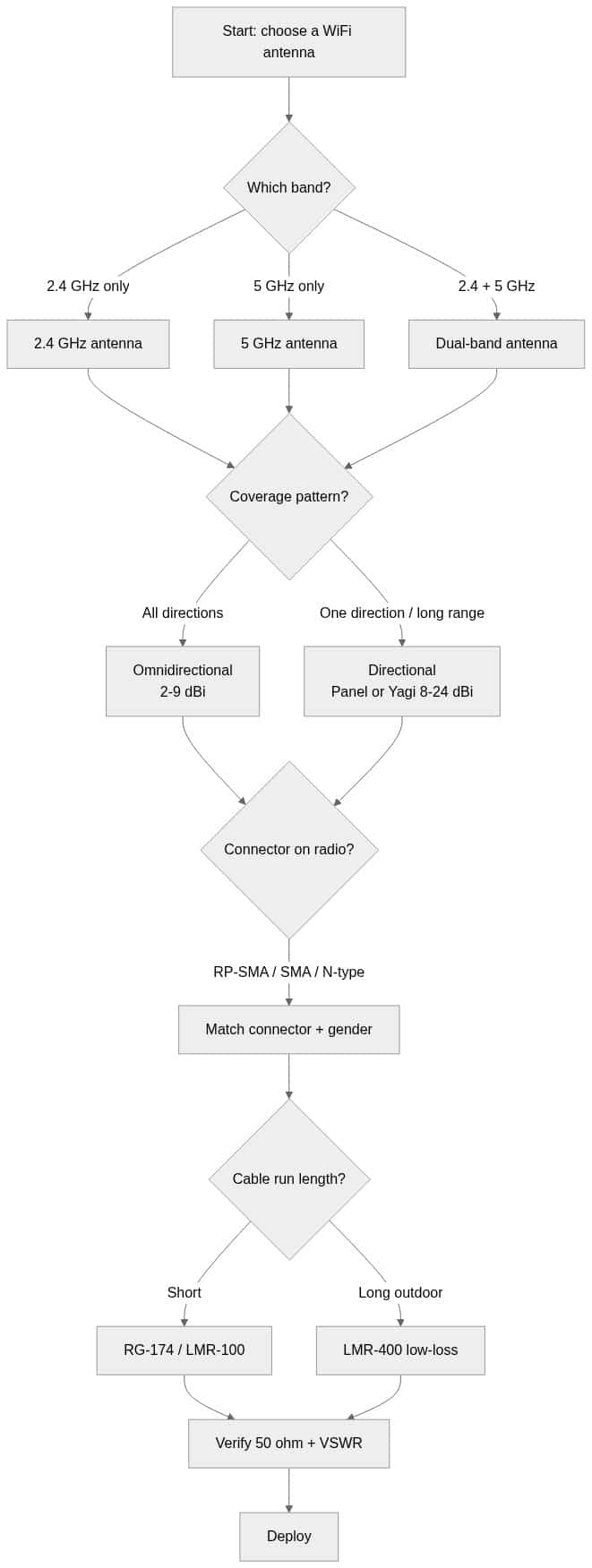
Every WiFi antenna is a 50-ohm RF device. Before anything else, confirm the antenna, the coax, and the radio are all 50 ohm — WiFi gear is never 75 ohm. After impedance, a usable WiFi antenna selection comes down to the decisions below, in order.
- Band — 2.4 GHz only, 5 GHz only, or dual-band. Must cover the band(s) your 802.11 radio transmits on.
- Gain (dBi) — higher gain reshapes the pattern; it does not create power out of nothing.
- Radiation pattern — omnidirectional for area coverage, directional for point-to-point or long reach.
- Connector + gender — RP-SMA is the WiFi default; verify male vs female before ordering.
- Cable & loss — the feedline between radio and antenna can erase the antenna's gain if it is long and lossy.
Choosing a WiFi antenna by frequency band
The band is the first filter. A 2.4 GHz-only antenna will not efficiently radiate a 5 GHz signal, and vice versa — the physical element length is tuned to the wavelength.
- 2.4 GHz — longer range and better wall penetration, but only three non-overlapping 20 MHz channels (1, 6, 11) and a crowded, noisy band. Good for IoT, legacy clients, and maximum coverage.
- 5 GHz — far more channels and higher throughput, but shorter range and weaker penetration. Preferred for high-density, high-bandwidth deployments.
- Dual-band — a single antenna tuned to resonate on both bands. The convenient default for modern 802.11ac/ax access points. Check that the published gain is specified per band, because gain is usually lower on 2.4 GHz than on 5 GHz for the same element.
If you are still deciding between bands, our breakdown of what 5 GHz WiFi is and what dBi means for your antenna covers the trade-offs in depth, and the dedicated 2.4 GHz antenna guide walks through gain and pattern on the lower band.
WiFi antenna gain (dBi) — what the numbers really mean
Gain is measured in dBi (decibels relative to an isotropic radiator) and it describes how the antenna focuses energy, not how much it amplifies. A passive antenna adds no power. A 9 dBi omnidirectional antenna reaches farther horizontally because it squashes the vertical pattern flatter — great across a warehouse floor, poor for multi-story coverage. Treat any consumer "high gain" claim with scepticism and verify the dBi figure and the pattern together.
Use these as realistic planning figures and confirm the exact number on the datasheet for the specific part:
| Antenna type | Pattern | Typical gain (2.4 GHz) | Typical gain (5 GHz) | Best use |
|---|---|---|---|---|
| Rubber duck / dipole | Omnidirectional | 2–5 dBi | 3–6 dBi | AP/router stock replacement, indoor |
| Ceiling dome | Omnidirectional (downward) | 3–5 dBi | 4–6 dBi | Indoor coverage from the ceiling |
| Outdoor omni (collinear) | Omnidirectional | 6–9 dBi | 8–12 dBi | Wide outdoor area, mast-mounted |
| Flat panel | Directional | 8–14 dBi | 14–19 dBi | Zone coverage, short/medium links |
| Yagi / grid / dish | Highly directional | 12–18 dBi | 18–24 dBi | Long-range point-to-point |
These ranges are typical, not guaranteed — always verify gain, VSWR and the radiation pattern on the manufacturer datasheet before you commit.
Omnidirectional vs directional radiation pattern
The pattern decides where the signal goes:
- Omnidirectional radiates 360° in the horizontal plane — the default for an access point that serves clients all around it. Raising gain narrows the vertical beamwidth, so a high-gain omni mounted too high can overshoot nearby clients.
- Directional (panel, Yagi, grid, dish) concentrates energy into a narrower beam for distance or to serve a specific zone, and it also rejects interference coming from off-axis. For a dedicated bridge between two buildings, a directional antenna at each end is almost always the right answer. Our Yagi antenna guide explains how directional gain, beamwidth and front-to-back ratio interact.
Mounting geometry matters as much as the antenna itself — a monopole needs an adequate counterpoise, which is why the ground plane antenna guide is worth reading before you finalise an outdoor omni.
Connectors: RP-SMA is the WiFi default
Most consumer and prosumer WiFi equipment uses RP-SMA (reverse-polarity SMA) — a historical regulatory convention to make swapping antennas less trivial. Standard SMA is common on cellular, GPS and many IoT radios, and the two will not mate correctly, so this is the single most common ordering mistake. Outdoor and higher-power gear often uses the larger, weatherproof N-type connector.
- RP-SMA — the WiFi standard; confirm whether the antenna is RP-SMA male or female against the jack on your radio.
- SMA — threaded 50-ohm connector rated to 18 GHz; common outside WiFi. Do not assume SMA and RP-SMA interchange.
- N-type — rugged, weatherproof, for outdoor antennas and long runs.
- U.FL / MHF4 — tiny board-level connectors on embedded radios and M.2 cards; you pigtail these out to RP-SMA.
If you are unsure which connector and gender your gear needs, our antenna connector types guide maps every common RF connector to its application.
Don't let the cable eat your gain
A high-gain antenna at the end of a long, thin, lossy cable can perform worse than a modest antenna on a short run. Coax loss rises with both frequency and length, and it is always higher at 5 GHz than at 2.4 GHz. For short jumpers, thin coax like RG-174 or LMR-100 is fine; for anything long or outdoor, step up to low-loss LMR-400. Plan the feedline as part of the link budget — see the antenna cable selection guide for real loss-per-foot figures and connector mapping.
A quick selection flow
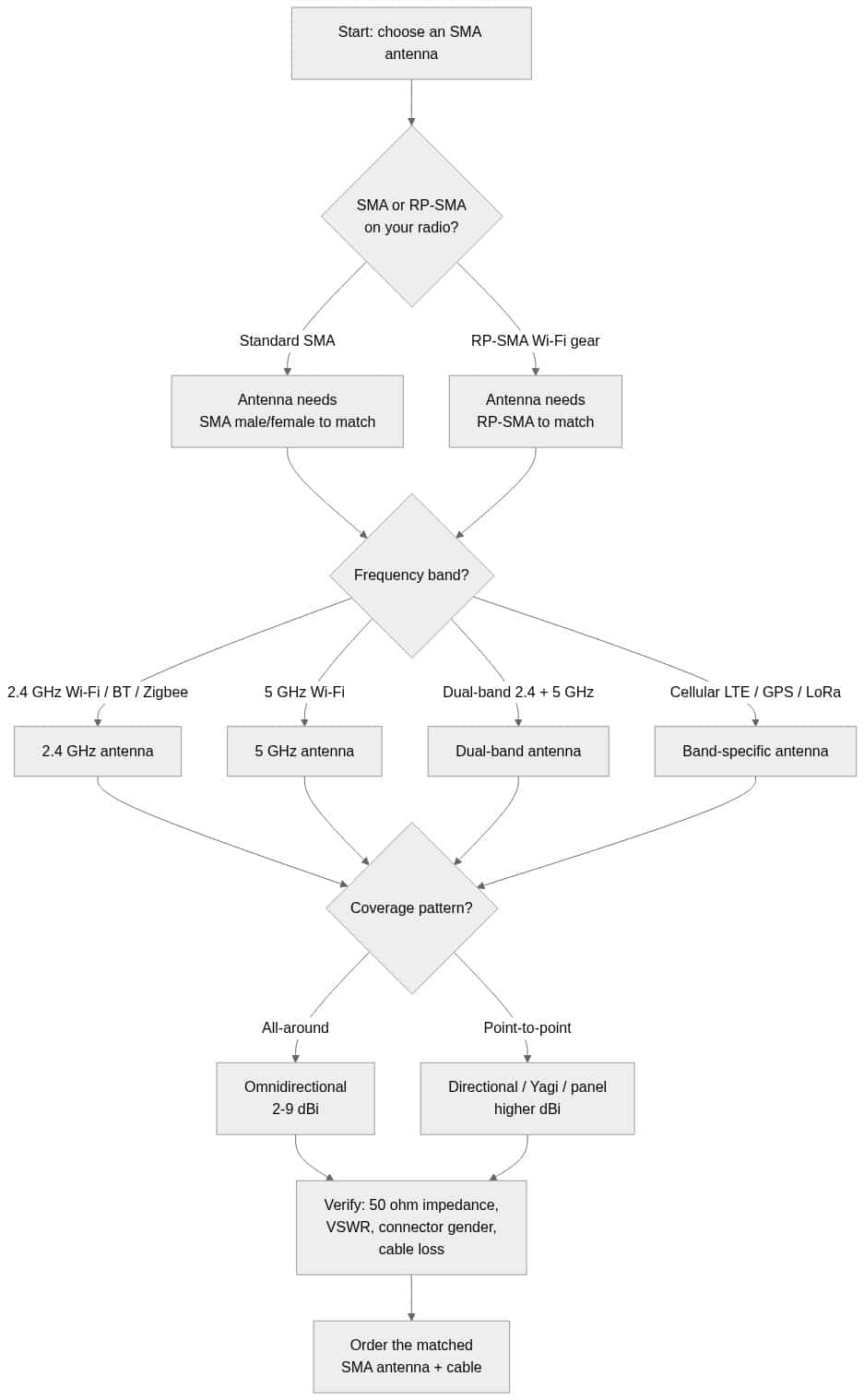
- Confirm the radio's band(s): 2.4 GHz, 5 GHz, or dual-band.
- Pick the pattern from the coverage goal: omni for all-around, directional for distance or a defined zone.
- Choose gain that fits the pattern and mounting height — higher is not always better.
- Match the connector and gender (usually RP-SMA for WiFi).
- Size the cable to the run and verify 50 ohm and acceptable VSWR on the datasheet.
Browse the full range of WiFi antennas at Data Alliance — 2.4 GHz, 5 GHz, and dual-band in omnidirectional and directional patterns — and pair them with custom-length assemblies from our antenna cables & adapters. Need a specific connector, length, or gain you don't see listed? Request a custom quote or contact technical support and we'll spec it for your deployment.
Frequently asked questions
What is a WiFi antenna?
A WiFi antenna is a 50-ohm antenna tuned to the 2.4 GHz and/or 5 GHz ISM bands used by 802.11 radios. It converts the radio's signal into radiated RF (and back) and is selected by band, dBi gain, radiation pattern, and connector.
Does a higher dBi WiFi antenna always give better range?
No. Higher gain focuses energy into a narrower pattern rather than adding power. A high-gain omni reaches farther horizontally but has a flatter vertical beam, so it can overshoot nearby or multi-floor clients. Match the gain to the pattern and the coverage goal rather than chasing the biggest number.
What connector do WiFi antennas use?
Most WiFi access points and routers use RP-SMA (reverse-polarity SMA). It looks similar to standard SMA but the two do not mate correctly, so verify RP-SMA versus SMA and the male/female gender against your radio before ordering. Outdoor gear often uses N-type.
Can I use a 2.4 GHz antenna on a 5 GHz network?
Not efficiently. The antenna element is tuned to a specific wavelength, so a 2.4 GHz-only antenna will present a poor match and radiate weakly at 5 GHz. For networks using both bands, choose a dual-band antenna and confirm the published gain for each band.
How long can the cable between my radio and WiFi antenna be?
It depends on the coax type and frequency, not a single fixed length. Thin coax loses a lot per foot, especially at 5 GHz, so keep jumpers short or use low-loss LMR-400 for long and outdoor runs. Always include cable loss in your link budget and verify the loss figure for the specific cable.
What impedance should a WiFi antenna be?
50 ohm. All WiFi antennas, coax, and radios are 50-ohm — never 75-ohm. Also check VSWR (a lower value is a better impedance match) on the datasheet before committing.