



Antennas, Antenna Cables, Wireless Products: Technical Articles
U.FL & MHF4 Antenna Cables: Thickness of Cable & other Key Considerations
Table of Contents
- Overview
- Coax Types for U.FL and MHF4 Cables
- Detailed Comparison of Cable Types
- Cable Selection Guidelines (Real-World)
- Practical Installation Tip (Highly Recommended)
- RF Performance & Attenuation
- Cable Construction (Why It Matters)
- Supported Applications
- Connector Types & Adapter Solutions
- Micro-Connector Considerations
- Data Alliance Engineering Recommendations
- Conclusion
- Quick Summary
- FAQs
Overview
U.FL and MHF4 antenna cables are widely used in compact RF applications where space is limited, such as:
- IoT devices
- Mini PCI / M.2 wireless cards
- Cellular modems (LTE / 5G)
- WiFi and Bluetooth modules
These micro-coax cable assemblies are critical for maintaining reliable RF performance while fitting into tight enclosures. One of the most important considerations when selecting these cables is coaxial cable thickness, as it directly affects:
- Signal loss (attenuation)
- Flexibility
- Mechanical stability
- Connector retention
At Data Alliance, we offer a range of U.FL cable assemblies and adapters designed for low loss, durability, and compatibility with real-world installations.
Coax Types for U.FL and MHF4 Cables
There are four primary coaxial cable types used in U.FL cable assemblies:
- 1.13 mm mini coax
- 1.32 mm mini coax
- 1.37 mm mini coax
- RG-174 equivalent coax
A less common option is:
- RG-178 coax
Key Common Characteristics
All of these cable types share the following:
- 50 Ohm impedance (standard for RF systems)
- Compatible with frequencies up to 6–11 GHz (and often higher depending on design)
- Black outer jacket
- RoHS and REACH compliant
Suitable for WiFi, cellular, and IoT applications
Important Limitation: MHF4 Cable Compatibility
MHF4 connectors are extremely small and can only be used with 1.13 mm coaxial cable.
- Not compatible with RG-174
- Not compatible with LMR-type cables
- Not compatible with thicker mini-coax
This is a key constraint when designing or selecting cables for compact LTE or 5G modules.
Detailed Comparison of Cable Types
1. 1.13 mm Mini-Coax (Ultra-Thin)
This is the most common cable used with U.FL and MHF4 connectors.
Advantages:
- Extremely thin and flexible
- Ideal for tight internal spaces
- Prevents stress on delicate U.FL connectors
- Required for MHF4
Use Cases:
- Inside enclosures
- MiniPCI / M.2 cards
- Embedded IoT devices
Important Note (Tech Support Insight):
In tight installations, thicker cables can cause the U.FL connector to pop off the PCB jack. In these cases, 1.13 mm cable is not optional—it is required.
Tradeoff:
- Higher signal loss compared to thicker cables
2. 1.32 mm Mini-Coax (Balanced Option)
This cable provides a balance between flexibility and performance.
Advantages:
- Lower signal loss than 1.13 mm
- Still relatively thin and flexible
- Often double-shielded
Use Cases:
- Medium-length internal runs
- Applications where slightly better RF performance is needed
3. 1.37 mm Mini-Coax
Less commonly specified, but similar to 1.32 mm:
- Slightly thicker
- Slightly lower loss
- Moderate flexibility
Used in specialized applications where a balance of performance and size is required.
4. RG-174 Equivalent (Best Performance for U.FL)
This is the thickest and lowest-loss option available for U.FL cables.
Advantages:
- Significantly lower signal loss
- Excellent shielding (braided + dielectric layers)
- Better performance for longer cable runs
Limitations:
- Too thick for MHF4
- May cause mechanical stress on U.FL connectors
- Not suitable for very tight spaces
Best Practice (Data Alliance Recommendation):
If space allows and connector retention can be secured, RG-174 is the preferred option for performance.
Cable Selection Guidelines (Real-World)
Choose 1.13 mm when:
- Space is extremely tight
- Using MHF4 connectors
- Cable length is short
- Connector retention is critical
Choose 1.32 / 1.37 mm when:
- You need better performance than 1.13 mm
- Space is limited but not extremely tight
- Moderate cable length
Choose RG-174 when:
- Cable length is longer
- Signal loss must be minimized
- Installation allows for thicker cable
You can secure the connector
Practical Installation Tip (Highly Recommended)
If using thicker coax like RG-174 with U.FL:
- Use hot glue or mechanical strain relief at the PCB
- This prevents connector detachment
- Greatly improves long-term reliability
This is a common field solution used by installers and integrators.
For applications requiring a U.FL connection to devices with antenna jacks using SMA Connector or RP-SMA Connector, antenna cable adapters are a convenient solution. Cables like RP-SMA to U.FL or SMA to U.FL provide compatibility between different connector types.
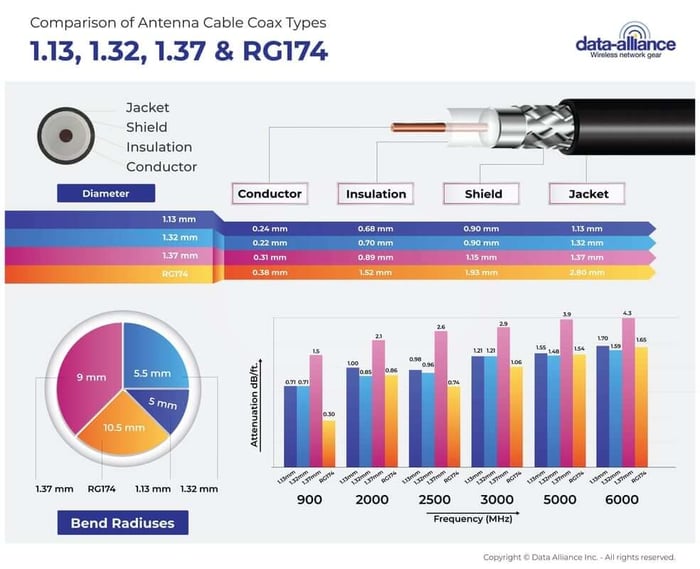
MHF4 cables, and W.FL cables cables can only be made with the very thin coax 1.13mm. MHF4 is not compatible with LMR100 and RG178.
1.13, 132, and RG174 coaxial cables: All three have a central, plastic insulated wire to conduct the RF signal, further surrounded by a braided mesh, shielding the conducting wire from electromagnetic interference. This conducting shield is covered by an outer insulating layer. The design provides extremely efficient data transmission and where appropriately connected to an antenna the RF signal can be transmitted with minimal signal loss.
1.13, 132, and RG174 coaxial cables range of frequency band compatibility (from 0 to 18GHz) and 50 Ohms impedance matching, makes them suitable and compliant for all the following applications:
- All WiFi standards: 2.4GHz and 5GHz applications: 802.11AC, 802.11N, 802.11G, 802.11B, 802.11A
- Cellular Wireless LTE / 4G, GSM / 3GWiMax: Data and voice applications
- IoT wireless & Bluetooth, ZigBee, RFID, LoRa, LTE-m, NB-IoT.
RF Performance & Attenuation
Signal loss increases with frequency and decreases with thicker cable.
Example: 1.13 mm Cable Attenuation
Frequency (MHz) | Attenuation (dB / 100m) |
1000 | 230 |
2000 | 310 |
3000 | 390 |
4000 | 460 |
5000 | 510 |
6000 | 580 |
Key Insight:
- At higher frequencies (WiFi 5 GHz, LTE, 5G), cable loss becomes significant
- This is why short cable length and proper cable selection are critical
See list of all of our articles about U.FL cables and connectors.
Cable Construction (Why It Matters)
All these coaxial cables share a similar structure:
- Central conductor (signal path)
- Dielectric insulation
- Shielding (braid or foil)
- Outer jacket
Higher-quality shielding (as in RG-174) results in:
- Lower signal loss
- Better EMI protection
- Improved overall RF performance
Supported Applications
These cable types are compatible with a wide range of wireless technologies:
WiFi
- 2.4 GHz and 5 GHz
- 802.11a/b/g/n/ac
Cellular
- LTE / 4G / 5G
- GSM / 3G
IoT & Short-Range Wireless
- Bluetooth
- ZigBee
- LoRa
- NB-IoT
- RFID
Connector Types & Adapter Solutions
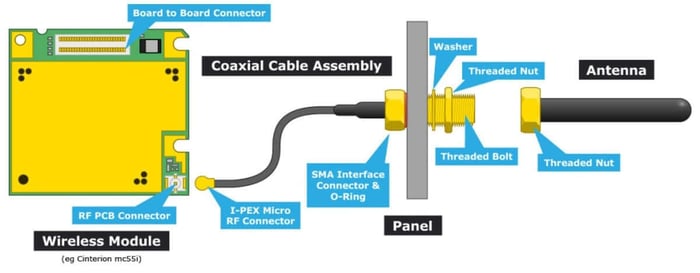
U.FL cables are often used to interface with external antennas via adapters:
- U.FL to SMA
- U.FL to RP-SMA
- MHF4 to SMA
- MHF4 to RP-SMA
These adapters allow integration with:
- External antennas
- Enclosures
- Panel-mount connectors
Data Alliance Focus:
We provide a wide range of adapter cables and custom assemblies to ensure compatibility across devices and antenna systems.
Important Connector Note
If your PCB has a U.FL jack:
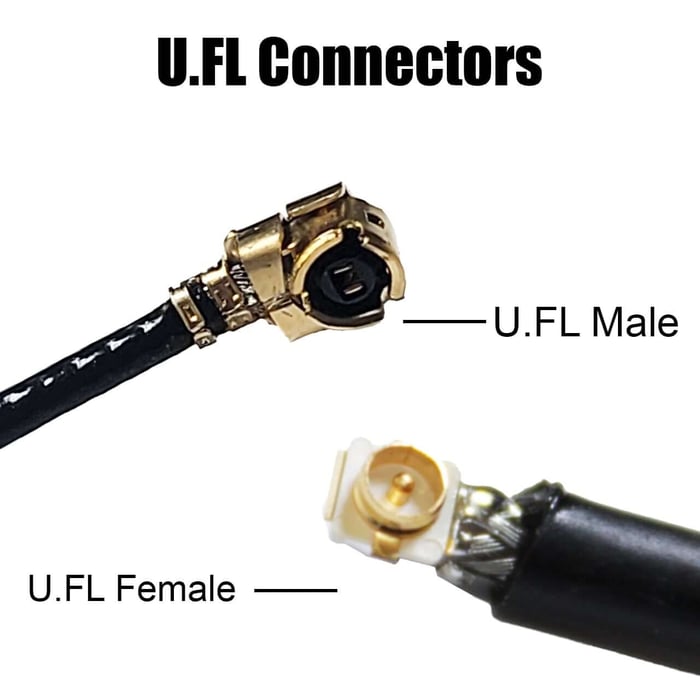
- The cable connector is typically referred to as U.FL plug (male)
- The PCB connector is the mating interface
Correct terminology is important when ordering or troubleshooting.
Micro-Connector Considerations
U.FL and MHF4 connectors are:
- Designed for limited mating cycles
- Sensitive to improper installation
Best Practices:
- Always align carefully before pressing
- Avoid pulling on the cable
Use proper tools when possible
 U.FL to SMA Cable diagram
If there is a U.FL jack on your PCB, it is a U.FL male.
Data Alliance Engineering Recommendations
From a real-world deployment perspective:
- Keep cables as short as possible
- Avoid sharp bends
- Use low-loss cable for longer runs
- Ensure secure connections
- Match connector types carefully
For custom applications, Data Alliance can provide:
- Custom cable lengths
- Specific connector combinations
- Optimized coax selection
Conclusion
U.FL and MHF4 antenna cables are essential components in modern wireless systems where space, performance, and reliability must be carefully balanced.
Key takeaways:
- 1.13 mm = best for tight spaces and MHF4
- 1.32 / 1.37 mm = balanced performance and flexibility
- RG-174 = best RF performance for U.FL (if space allows)
- Cable selection directly impacts signal quality and system reliability
By selecting the correct coax type and following best practices, you can ensure optimal RF performance across WiFi, cellular, and IoT applications.
Quick Summary
- MHF4 cables require 1.13 mm coax
- U.FL cables support multiple coax types
- Thicker cable = lower signal loss
- Thinner cable = better flexibility and fit
Always balance performance vs space constraints
FAQs
What is the difference between U.FL and MHF4 antenna cables?
U.FL and MHF4 are both micro RF connectors used in compact devices, but MHF4 connectors are smaller and require 1.13 mm coax only, while U.FL connectors support multiple coax types (1.13 mm, 1.32 mm, 1.37 mm, and RG-174). MHF4 is commonly used in newer LTE and 5G modules where space is extremely limited.
Which coax cable thickness is best for U.FL cables?
The best coax thickness depends on your application:
- 1.13 mm → best for tight spaces and short runs
- 1.32 / 1.37 mm → balanced performance and flexibility
- RG-174 → lowest signal loss and best for longer runs (if space allows)
Choosing the right thickness is a balance between performance and mechanical constraints.
Why does thicker coax cable have lower signal loss?
Thicker cables like RG-174 have better shielding and larger conductors, which reduce resistance and signal attenuation. This results in:
- Lower RF loss
- Better signal integrity
- Improved performance at higher frequencies
However, thicker cables are less flexible and may not fit in compact devices.
Can I use RG-174 coax with MHF4 connectors?
No. MHF4 connectors only support 1.13 mm coaxial cable due to their extremely small size. RG-174 and other thicker cables are not physically compatible.
Why do U.FL connectors sometimes pop off the PCB?
This usually happens when:
- The cable is too thick (e.g., RG-174 in tight spaces)
- There is mechanical stress or bending
- The connector is not fully seated
Solution: Use thinner coax (1.13 mm) or secure the connector with hot glue or strain relief.
What applications are U.FL and MHF4 cables used for?
These cables are widely used in:
- WiFi modules (2.4 GHz / 5 GHz)
- Cellular devices (LTE / 4G / 5G)
- IoT systems (LoRa, NB-IoT, ZigBee, Bluetooth)
- Embedded systems and M.2 / Mini PCI cards
They are ideal for applications requiring compact size and reliable RF performance.
How do I connect a U.FL cable to an external antenna?
You can use adapter cables, such as:
- U.FL to SMA
- U.FL to RP-SMA
- MHF4 to SMA
These adapters allow connection to external antennas, panel mounts, or enclosures, making integration easier in real-world deployments.