


Antennas, Antenna Cables, Wireless Products: Technical Articles
5 GHz WiFi Explained: Channels, Range, Speed & Antenna Selection
Table of Contents
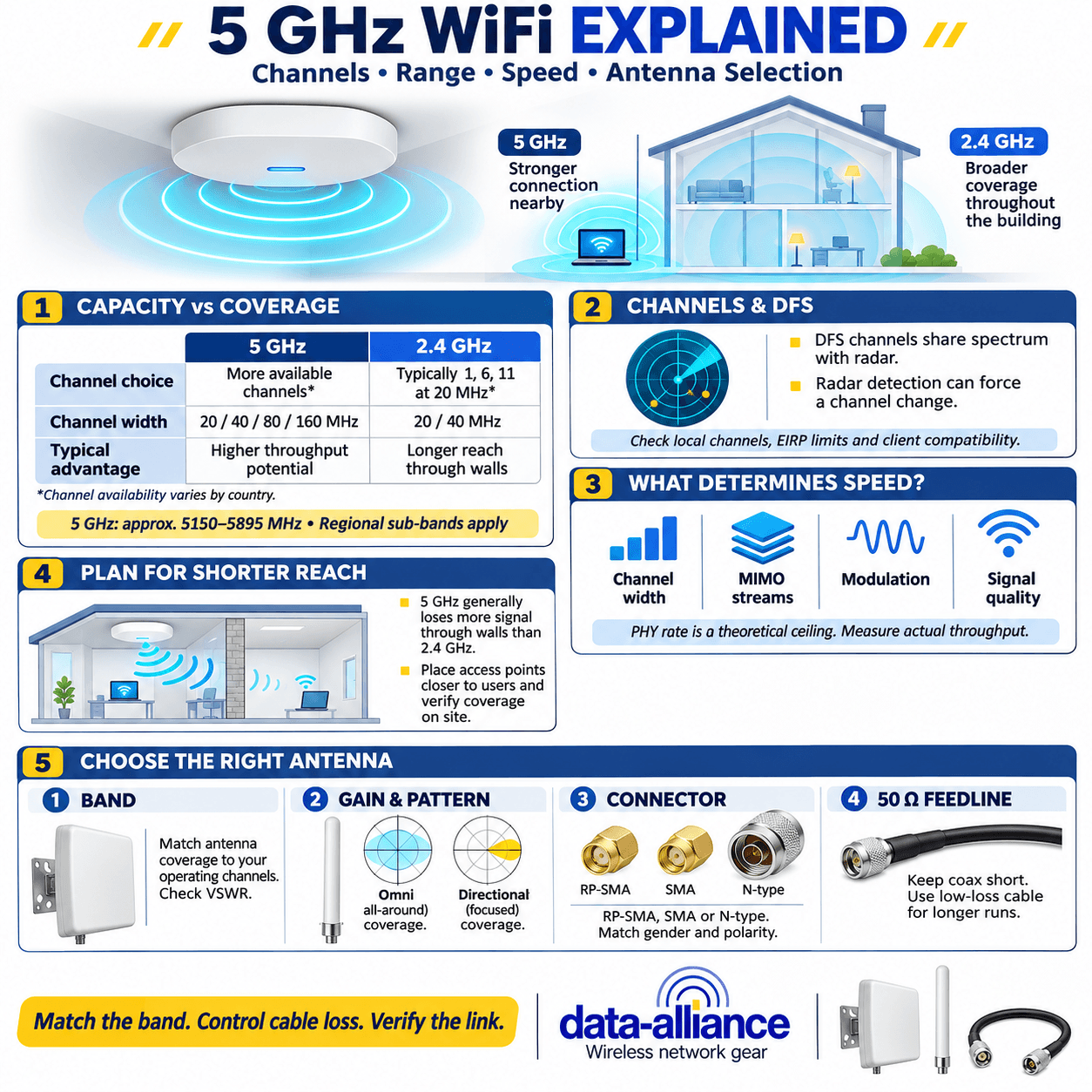
5 GHz WiFi is the band that 802.11 radios use for high-throughput links — it spans roughly 5150–5895 MHz (versus the crowded 2400–2483.5 MHz of 2.4 GHz) and gives you far more non-overlapping channels and wider channel bandwidths. The trade-off is physics: 5 GHz carries more data but travels a shorter distance and penetrates walls less effectively than 2.4 GHz. If you are choosing between bands or specifying hardware, this guide covers the channels, range, real-world speed, and how to pick the right 5 GHz antenna and feedline.
This is written for IT professionals, network consultants, and integrators who make decisions on verifiable specs — so where a number depends on your gear, we say what to measure rather than inventing a figure.
Why choose 5 GHz WiFi over 2.4 GHz?
The decision comes down to a well-understood trade between capacity and coverage. 5 GHz WiFi wins on throughput and channel availability; 2.4 GHz wins on raw range and obstruction penetration. In practice most deployments run dual-band and let clients steer to the band that serves them best.
- Channel count: 2.4 GHz realistically offers only three non-overlapping 20 MHz channels (1, 6, 11). 5 GHz offers many more, which is the single biggest reason it handles dense client environments better.
- Channel width: 5 GHz supports 20, 40, 80 and (with 802.11ac Wave 2 / 802.11ax) 160 MHz channels. Wider channels mean more throughput per link.
- Range & penetration: higher frequency means higher free-space path loss and greater attenuation through walls, so 5 GHz coverage radius is shorter. Plan more access points, or a higher-gain directional antenna, to cover the same area.
- Interference: 2.4 GHz shares spectrum with Bluetooth, microwaves, and legacy devices. 5 GHz is generally quieter, though not empty.
For a deeper look at the physical properties of the band, see our reference on 5 GHz wireless frequency properties and how they compare to 2.4 GHz WiFi.
5 GHz WiFi channels and DFS
The 5 GHz band is divided into sub-bands (commonly referred to as UNII-1, UNII-2, UNII-2-Extended and UNII-3 in the US). Exact channel availability and allowed transmit power are set by regional regulators (FCC, ETSI, etc.), so verify the legal channels and EIRP limits for your country and band before you lock a design.
A large portion of the 5 GHz band is subject to DFS (Dynamic Frequency Selection). DFS channels are shared with radar; your access point must listen for radar and vacate the channel if it detects a hit, which can cause a brief outage. Points to plan around:
- DFS channels add spectrum (more room for wide channels and dense APs) but can be interrupted near airports, weather radar, or military installations.
- Some client devices do not support all DFS channels — confirm client support before relying on them.
- Non-DFS channels (UNII-1 and UNII-3) are the "safe" fallbacks when reliability matters more than capacity.
Channel planning matters on both bands. For the 2.4 GHz side and general channel hygiene, our WiFi channels guide walks through non-overlapping channel selection.
5 GHz WiFi speed: 802.11ac and 802.11ax
5 GHz is where the high-throughput 802.11 standards live. Real-world speed depends on channel width, spatial streams (MIMO), modulation (MCS), and signal quality — not just the band. The table below shows the mechanisms that drive 5 GHz throughput; treat PHY rates as theoretical ceilings and measure actual throughput on your gear.
5 GHz band reference
| Parameter | 5 GHz WiFi | 2.4 GHz WiFi (for comparison) |
|---|---|---|
| Frequency range | ~5150–5895 MHz (regional sub-bands) | 2400–2483.5 MHz |
| Non-overlapping 20 MHz channels | Many (region/DFS dependent) | 3 (channels 1, 6, 11) |
| Channel widths | 20 / 40 / 80 / 160 MHz | 20 / 40 MHz |
| Primary standards | 802.11a/n/ac/ax | 802.11b/g/n/ax |
| Relative range | Shorter | Longer |
| Wall penetration | Lower | Higher |
| DFS / radar sharing | Yes, on many channels | No |
For how the generations stack up and when each applies, see our comparison of 802.11ac vs 802.11n, g, a and b, and our broader complete WiFi 802.11 standards guide.
How to choose a 5 GHz antenna
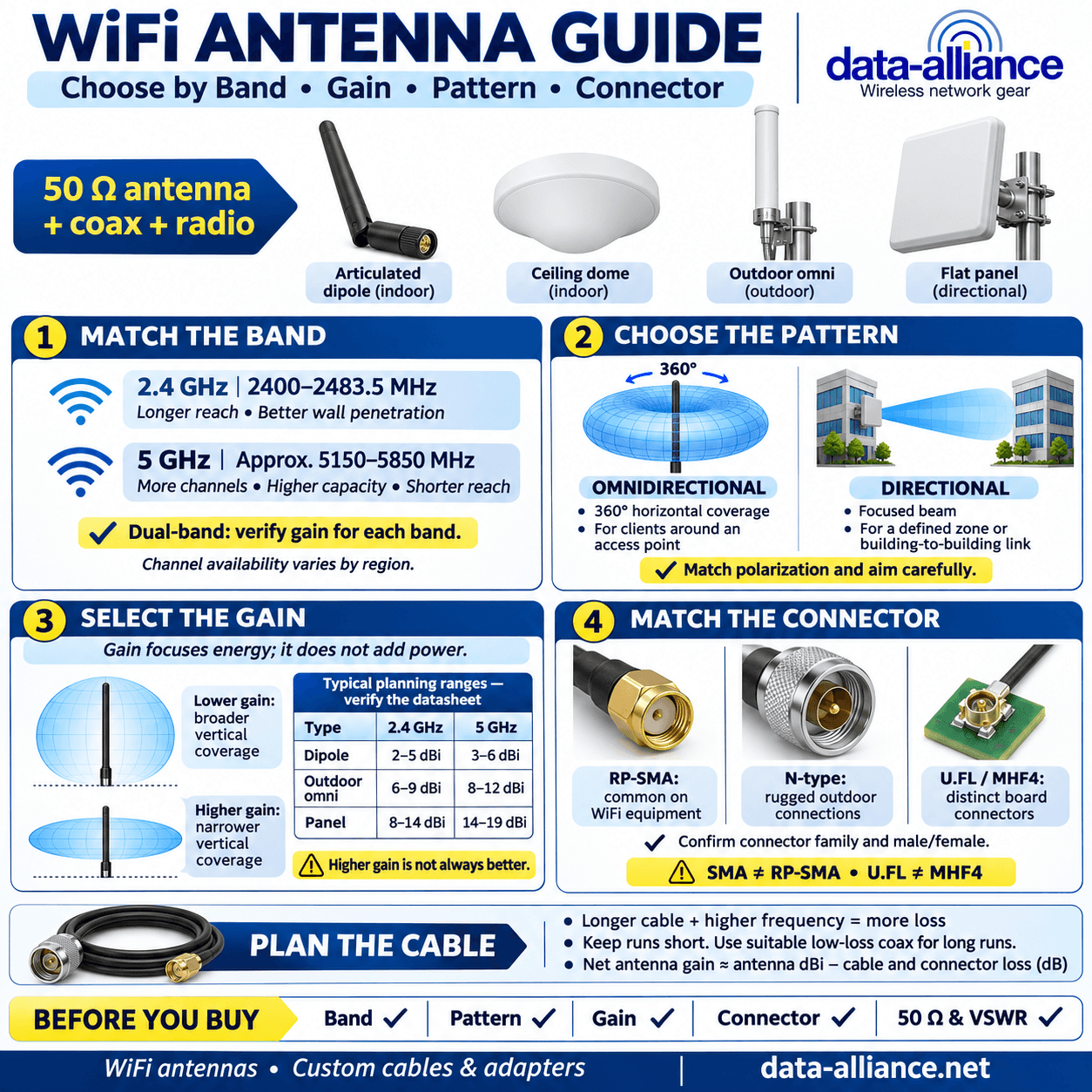
Because 5 GHz has a shorter reach, the antenna and feedline matter more than they do at 2.4 GHz — path loss is higher and every dB of cable loss is more expensive to your link budget. Match four things:
- Band coverage: a true 5 GHz antenna (or a dual-band 2.4/5 GHz antenna) must be tuned across the full 5150–5895 MHz range, not just part of it. Check the manufacturer's VSWR/return-loss plot across the whole band.
- Gain and pattern: omnidirectional for all-around coverage, directional (panel or Yagi-style) to push range in one direction. Higher dBi narrows the vertical beamwidth — verify the published gain figure rather than assuming.
- Connector: most WiFi gear uses RP-SMA; some radios use SMA or N-type. All are 50-ohm. Match gender and polarity exactly.
- Impedance & feedline: 50-ohm throughout. Because loss rises with frequency, keep 5 GHz runs short or step up to low-loss coax (e.g. LMR-400) for longer runs.
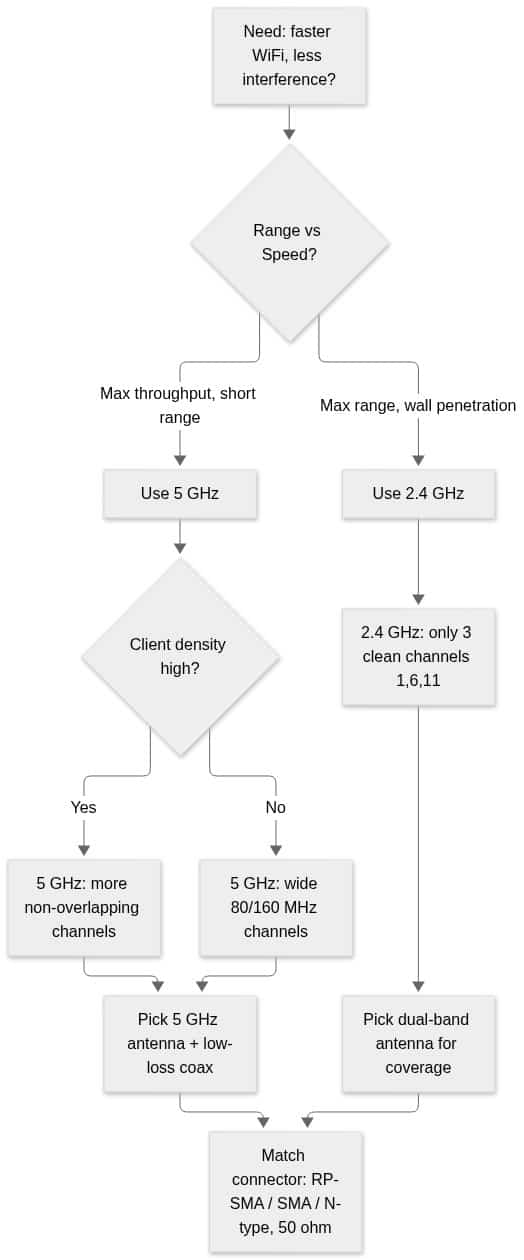
5 GHz band decision flow
The diagram below summarizes the band and hardware decision for a typical deployment.
Ready to spec hardware? Browse our WiFi antennas (2.4 GHz, 5 GHz and dual-band) and our antenna cables and adapters for the matching low-loss feedline and connectors. Need an assembly built to length with a specific connector? Request a custom quote or contact our technical support team and we can ship same day on orders placed before 4pm MST.
Frequently asked questions
Is 5 GHz WiFi faster than 2.4 GHz?
For a given standard, yes — 5 GHz supports wider channels (up to 80/160 MHz) and cleaner spectrum, which raises throughput. But "faster" assumes a strong signal; at the edge of coverage, 2.4 GHz can deliver a more usable link because it travels farther. Measure throughput at the client location rather than relying on the band alone.
Why does my 5 GHz WiFi have shorter range?
Higher frequencies have higher free-space path loss and are attenuated more by walls and obstructions. That is inherent to 5 GHz. Compensate with more access points, a higher-gain or directional antenna, and short, low-loss coax runs.
What are DFS channels on 5 GHz?
DFS (Dynamic Frequency Selection) channels are 5 GHz channels shared with radar systems. Your access point must detect radar and move off the channel if it appears, which can briefly interrupt service. They add valuable spectrum but should be validated for client support and for sites near radar.
What connector does a 5 GHz WiFi antenna use?
Most consumer and enterprise WiFi gear uses RP-SMA; some radios use standard SMA or N-type. All are 50-ohm. Confirm the connector type, gender, and polarity on both the radio and the antenna before ordering.
Do I need a special antenna for 5 GHz?
You need an antenna tuned for the 5 GHz band — either a dedicated 5 GHz antenna or a dual-band 2.4/5 GHz model. A 2.4 GHz-only antenna will perform poorly at 5 GHz. Check the VSWR/return-loss specification across the full 5150–5895 MHz range.