


Antennas, Antenna Cables, Wireless Products: Technical Articles
Wi-Fi & LTE Antenna Installations: How To Choose the Best Coaxial Cable
Table of Contents
Coaxial Cable for Wi-Fi & LTE Antenna Installations
Choosing the right coaxial cable for a Wi-Fi or LTE antenna installation is critical for maintaining strong signal quality, minimizing signal loss, and ensuring long-term reliability—especially in outdoor environments. The cable you select directly impacts overall system performance, particularly at higher frequencies such as 2.4 GHz, 5 GHz, and LTE/5G bands.
For outdoor antenna installations, always use high-quality, double-shielded coaxial cable designed for RF applications.
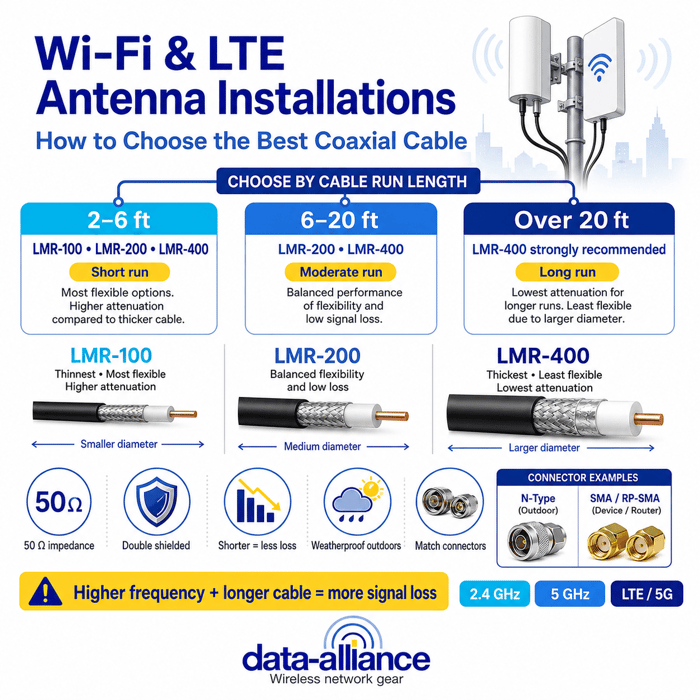
Recommended Coaxial Cable Types by Cable Length
Short cable runs (2–6 feet)
For very short runs where flexibility, diameter, and cost may be priorities:
- LMR-100
- LMR-200
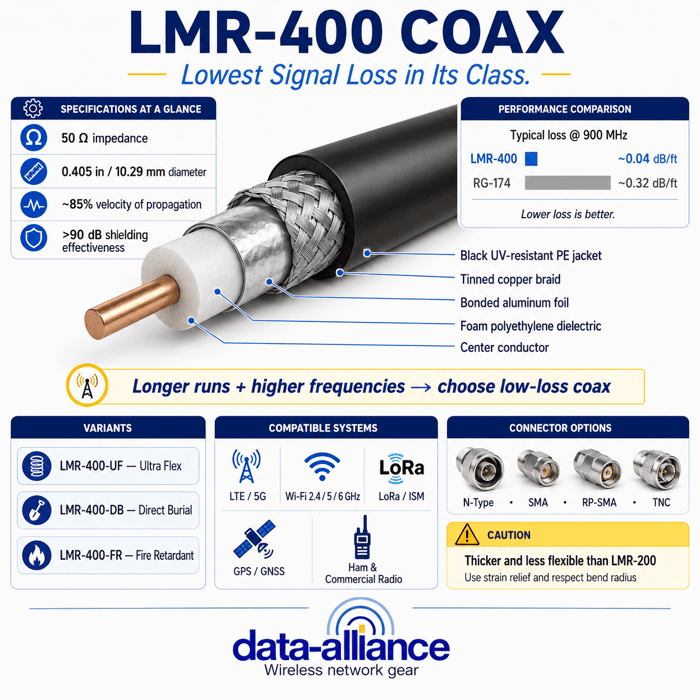
- LMR-400
LMR-100 can be acceptable at these lengths, but LMR-200 or LMR-400 will still provide lower attenuation and better long-term performance.
Moderate cable runs (6–20 feet)
For moderate distances:
- LMR-200
- LMR-400
LMR-200 offers a balance between flexibility and signal loss, while LMR-400 provides noticeably lower attenuation—especially beneficial at Wi-Fi and LTE frequencies.
Longer cable runs (over 20 feet)
For longer cable runs:
- Strongly recommended: LMR-400 or equivalent low-loss coax
While LMR-200 can be used beyond 20 feet, LMR-400 should be seriously considered due to its significantly signal loss (attenuation) at higher frequencies.
Low-Loss Coaxial Cable Options for Outdoor Antenna Installations
Low-loss coaxial cables such as LMR-100, LMR-200, and LMR-400 are designed to preserve signal strength over distance. As cable diameter increases, attenuation decreases—but flexibility and cost also change. Selecting the right cable involves balancing these factors based on run length and installation conditions.
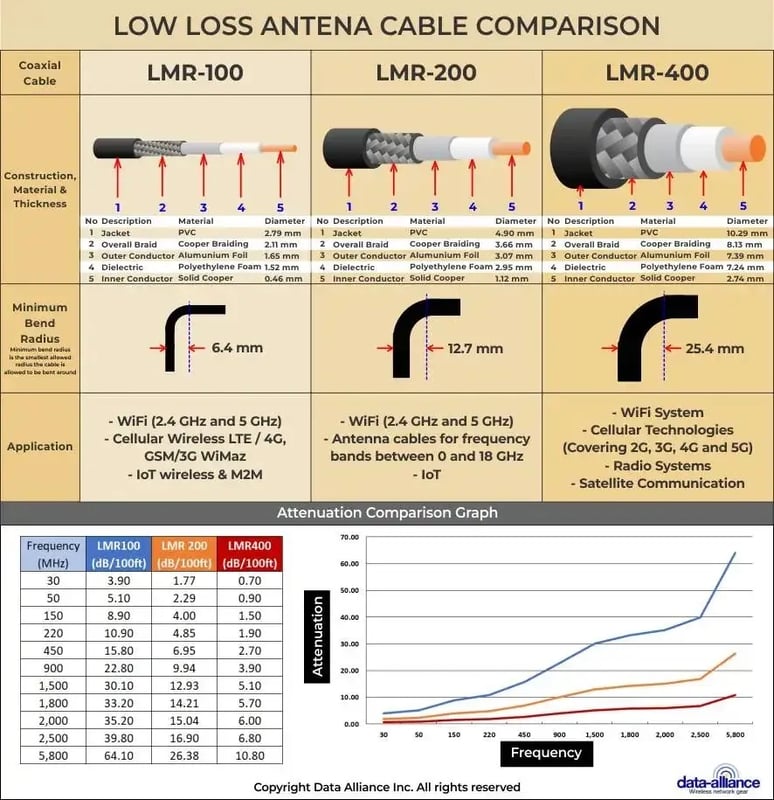
Key Technical & Installation Considerations
Impedance
Wi-Fi and LTE equipment requires 50-ohm coaxial cable. LMR-100, LMR-200, and LMR-400 are all 50-ohm cables and fully compatible with Wi-Fi, LTE, and cellular systems. Using the wrong impedance can cause reflections, signal loss, and reduced performance.
Shielding
Effective shielding protects against interference from nearby electronics and RF noise, which is especially important in urban or industrial environments.
- Look for double-shielded coax (foil + braided metal)
- LMR-100, LMR-200, and LMR-400 are all double-shielded
- These provide better interference rejection than many single-shielded RG-series cables
Attenuation (Signal Loss)
Attenuation is the signal loss that occurs as RF energy travels through the cable.
- Loss increases with frequency and cable length
- Specifications are typically listed in dB per 100 feet
- Lower dB values are better
Always check attenuation values at 2.4 GHz, 5 GHz) and LTE frequencies when selecting a cable. The various coax types have have different amounts of signal loss per foot (or meter), that varies based on the shielding and the diameter of the conductor wire. Check the specifications for attenuation, which is usually given in dB per 100 feet. Lower is better.
Cable Length
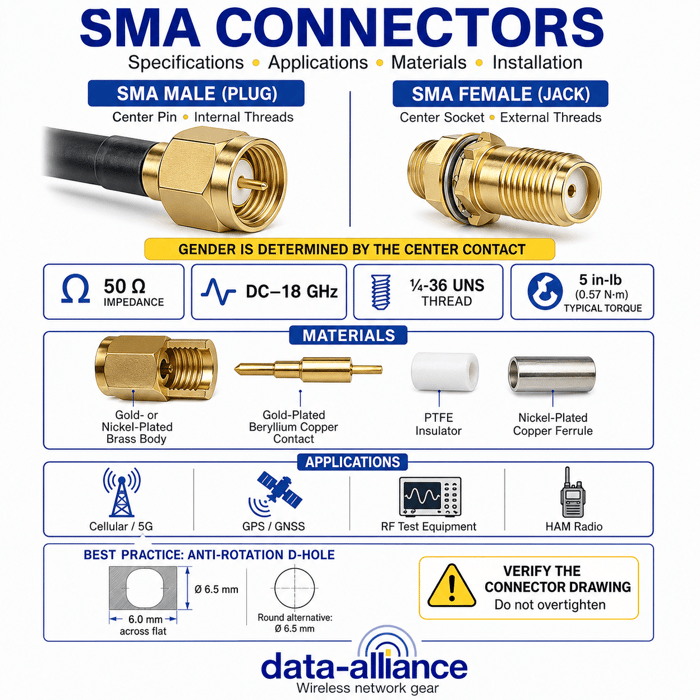
Use the shortest length of cable possible to connect your antenna to your device. Longer cables result in more signal loss (attenuation). In some cases, you might need to extend the reach of an existing cable connection. In such scenarios, you can use an SMA extension cable. These cables maintain the same connector type (SMA) on both ends and allow you to add additional length to your existing cable run while minimizing signal loss. In such a situation, you can use antenna cable adapters to switch between different connectors.
Weather Resistance (Outdoor Installations)
Outdoor coaxial cable must withstand:
- UV exposure
- Rain and moisture
- Temperature fluctuations
Look for:
- UV-resistant jackets
- Weather-rated connectors
- Proper Weatherproofing at all outdoor connection points
Flexibility vs. Durability
Thicker cables (like LMR-400) offer lower loss but are less flexible.
Thinner cables (LMR-100, LMR-200) are easier to route but have higher attenuation.
Choose based on:
- Bend radius requirements
- Routing constraints
- Mounting and strain-relief needs
Connector Compatibility
Ensure the cable is compatible with the connectors used by your antenna and Wi-Fi equipment. The most common connectors for outdoor Wi-Fi antennas are N-Type. SMA cables can also be used in certain situations. They offer a good balance between performance and cost compared to LMR cables and might be suitable for specific applications where N-Type connectors are not compatible. RP-SMA is more common for indoor antennas. The quality of the connectors and the installation (properly crimped and weatherproofed) are crucial for maintaining signal integrity.
Use Quality Connectors
Poor-quality connectors can introduce noise and signal loss. Use high-quality, corrosion-resistant connectors and ensure they are properly attached. Nickel-plated Type-N connectors are the superior option for outdoor installations.
Cost & Brand Quality
While higher-quality coaxial cable costs more, it often delivers:
- Better performance
- Longer lifespan
- Fewer troubleshooting issues
Choose reputable manufacturers and suppliers, especially for outdoor and long-run installations.
Frequency Range
Ensure the cable supports your required frequency bands.
LMR-100, LMR-200, and LMR-400 are compatible with:
- Wi-Fi (2.4 GHz & 5 GHz)
- LTE & cellular bands
- Many ISM and RF applications
Remember, the best cable for your installation depends on your specific needs, the distance between your antenna and your wireless device, the type of signals you're receiving (e.g., Wi-Fi, LTE, GPS), and the environment in which the cable will be installed.
In conclusion
Selecting the right coaxial cable for Wi-Fi and LTE antenna installations is a balance of minimizing signal loss, ensuring proper impedance and shielding, and choosing materials suited for the installation environment. By matching cable type and length to your specific run, using quality connectors, and prioritizing durability for outdoor conditions, you can achieve reliable performance and maximize the effectiveness of your antenna system.
FAQs
What coaxial cable is best for long outdoor Wi-Fi or LTE antenna runs?
For long cable runs, especially over 20 feet, LMR-400 (or equivalent) is recommended due to its low attenuation at Wi-Fi and LTE frequencies, which helps preserve signal strength and overall system performance.
Can I use LMR-100 or LMR-200 for short antenna cable runs?
Yes. For short runs (approximately 2 to 6 feet), LMR-100, LMR-200, or LMR-400 can all be used. However, LMR-200 or LMR-400 is preferred if minimizing signal loss is critical, especially at higher frequencies.
Why is 50-ohm impedance important for Wi-Fi and LTE coaxial cables?
Wi-Fi and LTE equipment are designed for 50-ohm systems. Using a cable with the wrong impedance can cause signal reflections, increased loss, and reduced antenna performance. LMR-100, LMR-200, and LMR-400 are all 50-ohm cables.
What type of connectors are best for outdoor antenna installations?
N-Type connectors are the most common and reliable choice for outdoor Wi-Fi and LTE antennas due to their durability and weather resistance. High-quality, nickel-plated N-Type connectors are especially recommended. SMA connectors may be used in certain applications, while RP-SMA is more common indoors.
How does cable length affect Wi-Fi and LTE antenna performance?
Longer cable lengths increase signal attenuation, reducing overall performance. Always use the shortest cable length possible while allowing for proper routing and bend radius. If extra length is required, using a higher-quality, low-loss cable helps minimize performance loss.