



Antennas, Antenna Cables, Wireless Products: Technical Articles
What Is 5GHz WiFi? And What Does dBi Mean for Your Antenna?
Table of Contents
Introduction
Two of the most common questions we get from customers — whether they're seasoned installers or just getting into wireless networking — are these: "What is 5GHz WiFi, and is it better than 2.4GHz?" and "What does dBi mean on an antenna spec sheet?"
They're connected. Understanding frequency and antenna gain together helps you make smarter decisions about your wireless setup. So let's cover both. Clearly and practically.
What Is 5GHz WiFi?
WiFi operates on radio frequency bands. The two most common are 2.4GHz and 5GHz. A third — 6GHz — is now emerging with WiFi 6E.
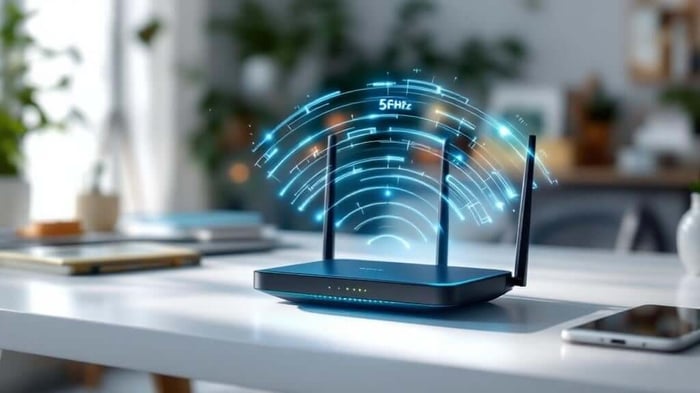
The 5GHz band offers faster data speeds and less interference than 2.4GHz. That's the short version. Here's why.
2.4GHz vs 5GHz — The Real Differences
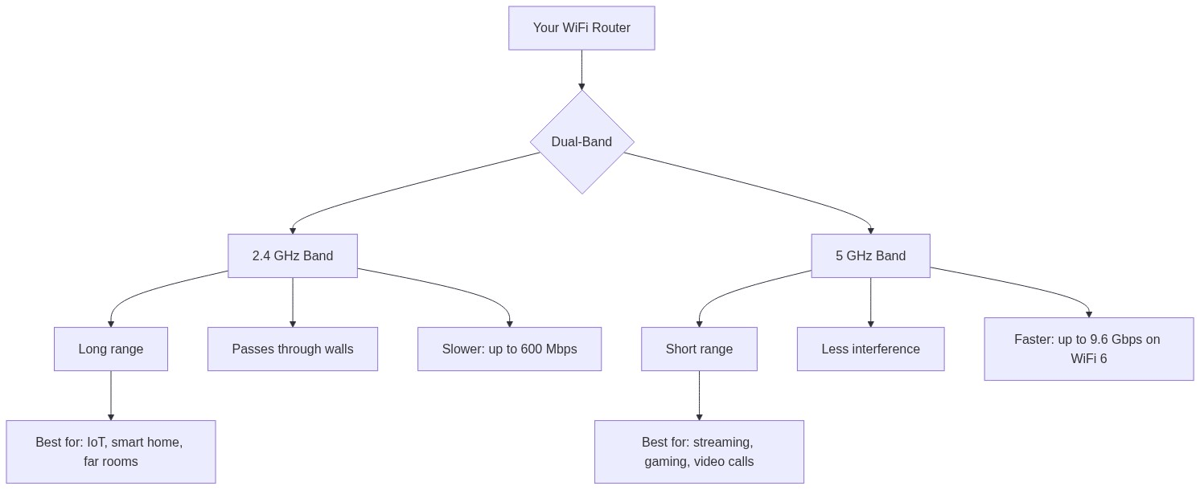
2.4GHz has been around longer. It travels further and penetrates walls and obstacles more effectively. But it's also crowded. Bluetooth devices, baby monitors, microwave ovens, and neighboring WiFi networks all compete on the same band. Interference is a constant issue.
5GHz operates at a higher frequency. It carries more data, much faster. Think streaming 4K video or running cloud applications without lag. The tradeoff is range. Higher frequencies don't travel as far through walls and solid objects.
So which should you use? It depends on your situation.
- Close range, high throughput: Use 5GHz.
- Long range or through walls: Stick with 2.4GHz.
- Modern dual-band routers let you use both. Your devices connect to whichever band suits them best.
What About WiFi 6 and 6E?
WiFi 6 (802.11ax) works on both 2.4GHz and 5GHz bands and significantly improves how multiple devices share bandwidth. It's more efficient in dense environments — like offices, apartment buildings, or industrial sites with dozens of connected devices.
WiFi 6E adds the 6GHz band. Even faster and less congested. It's ideal for high-throughput, short-range applications where you control the environment. Just note that 6GHz signals penetrate obstacles even less than 5GHz. Plan your installation accordingly.
What Is dBi? Antenna Gain Explained Simply
You've seen it on spec sheets. 5dBi. 9dBi. 15dBi. But what does it actually mean?
dBi stands for decibels relative to isotropic. It's the unit used to measure antenna gain — specifically, how much an antenna focuses RF energy in a particular direction compared to a theoretical reference antenna that radiates equally in all directions.
Think of it this way. A bare light bulb spreads light equally in all directions. That's 0 dBi. Now add a reflector behind the bulb. The light in front gets brighter — not because you added more power, but because you redirected energy. That's what higher dBi does.
An important point: antennas don't create power. They redistribute it.
What Does Higher dBi Actually Mean in Practice?
Higher dBi means more directionality. The antenna focuses energy into a narrower beam, increasing signal strength and range in that direction — but reducing coverage in others.
Here's a practical breakdown:
- 3 dBi: Wide coverage, omnidirectional. Good for indoor environments or where signal can come from any direction.
- 5 dBi: Moderate gain. A popular choice for outdoor omnidirectional deployments in suburban areas.
- 9 dBi: Higher gain. Better range but a narrower beam. Used in semi-directional outdoor links.
- 15–24 dBi: High-gain directional antennas. Used for long-distance point-to-point links where you know exactly where the signal is coming from.
Is Higher dBi Always Better?
No. This is probably the most common misconception in wireless networking.
If you're deploying a point-to-point link across a flat field to a tower 5 kilometers away, a 15 dBi directional antenna is perfect. You know where the signal is. You aim it. Done.
But if you're setting up a wireless access point inside a building where devices connect from all directions — above, below, left, right — a 3 or 5 dBi omnidirectional antenna gives you much better overall coverage. A high-gain antenna in that environment creates dead zones.
Also worth knowing: many online retailers exaggerate dBi numbers. A 9 dBi antenna listed as 12 dBi is a real problem in the industry. At Data Alliance, we don't do that. We sell to technical customers, engineers, and consultants who depend on accurate specifications. Visit data-alliance.net to see honest specs on every product we carry.
How to Choose the Right WiFi Antenna
Here's a simple decision framework:
Indoor Coverage
Go omnidirectional, low-to-medium gain (3–5 dBi). You want coverage in all directions, not a focused beam.
Outdoor Point-to-Point Links
Go directional, high gain (9–24 dBi depending on distance). Aim carefully. Use quality low-loss cable between the antenna and radio.
Outdoor Area Coverage (Omni)
Choose a 5–9 dBi omnidirectional antenna mounted high and clear of obstructions. Avoid mounting near metal surfaces.
What About Cable?
The antenna is only part of the equation. Every meter of cable between your antenna and radio introduces signal loss. Use LMR-200 equivalent cable for runs up to 9 meters. For longer runs, LMR-400 equivalent is the right choice. All Data Alliance cables are low-loss, double-shielded, and use soldered connectors for maximum signal integrity.
About the Author — Data Alliance
Data Alliance has been a manufacturer and distributor of wireless networking equipment since 2004. We were one of the first Ubiquiti partners in 2006 and have shipped to over 110,000 customers in 95 countries. We manufacture our own antenna cables and custom antennas. Every product specification on our site is factual — because our customers are technical professionals who depend on accuracy.
Browse our full range of WiFi antennas, LTE antennas, and low-loss cables at data-alliance.net.
FAQs
What is 5GHz WiFi and how is it different from 2.4GHz?
5GHz WiFi operates at a higher frequency than 2.4GHz, offering faster data speeds and less interference. However, it has shorter range and lower wall-penetration than 2.4GHz. Use 5GHz for high-speed short-range connections and 2.4GHz for longer range or where obstacles are a factor.
What does dBi mean on an antenna?
dBi stands for decibels relative to isotropic. It measures how much an antenna focuses RF energy in a specific direction compared to a theoretical antenna that radiates equally in all directions. Higher dBi means more directionality and longer range in that direction, but narrower coverage overall.
Is a higher dBi antenna always better for WiFi?
Not necessarily. Higher dBi improves range in the focused direction but creates blind spots in others. For omnidirectional indoor use, 3–5 dBi is usually optimal. For outdoor directional long-range links, 9–24 dBi is appropriate.
Does my antenna cable affect WiFi performance?
Yes. Every meter of coaxial cable introduces signal loss. Using low-quality or overly long cables can negate the gains from a high-quality antenna. Always use low-loss LMR-200 or LMR-400 equivalent cable and keep runs as short as practical.
What WiFi standard should I deploy in 2026?
WiFi 6 (802.11ax) is the current standard for high-density or high-performance deployments. WiFi 6E adds the 6GHz band for even faster speeds in short-range applications. For legacy compatibility, dual-band routers supporting both 2.4GHz and 5GHz remain practical for most installations.