




Antennas, Antenna Cables, Wireless Products: Technical Articles
WiFi: A Complete Guide to 802.11 Standards & Key Network Components
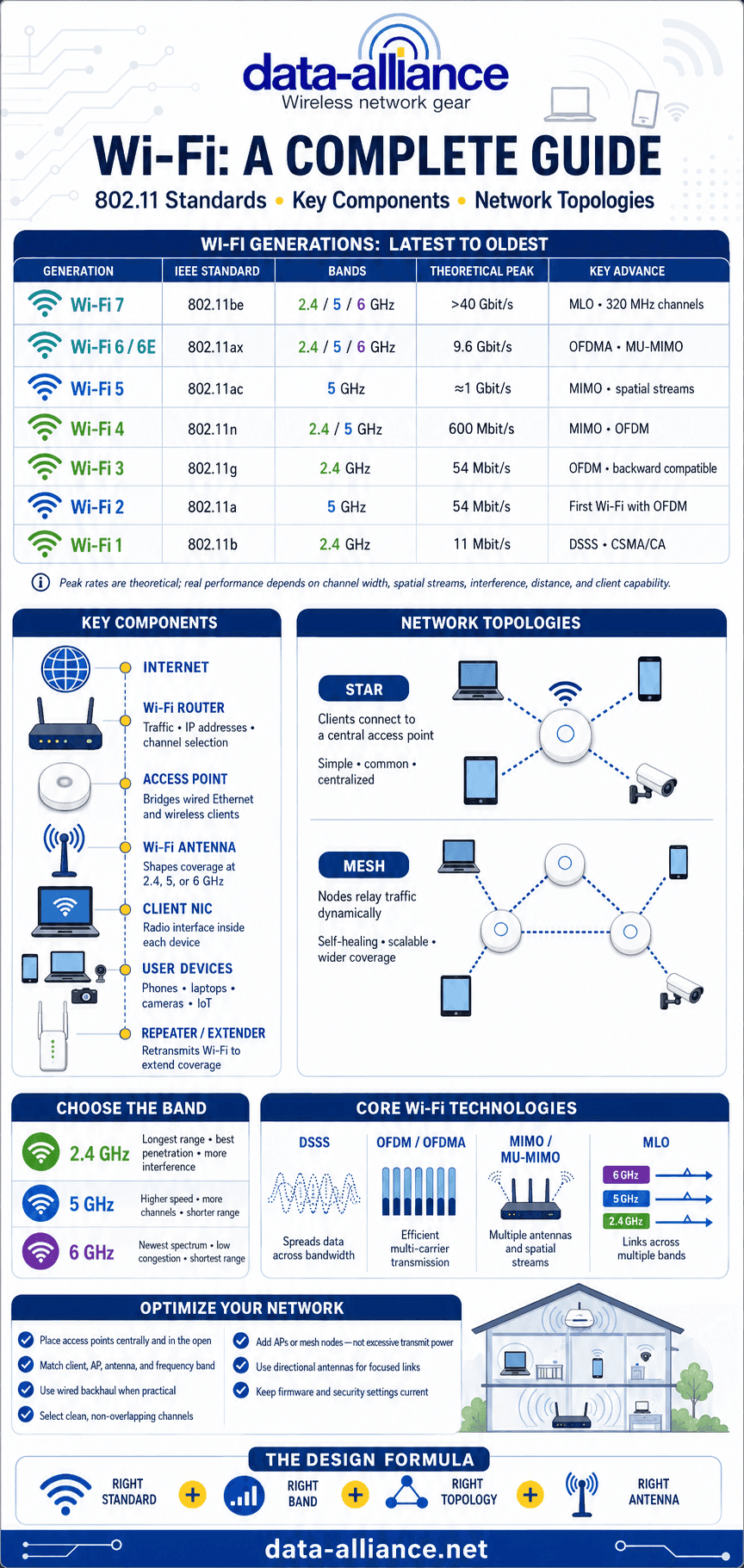
This is a complete guide to the WiFi 802.11 standards and the key components of a WiFi network. It compares every generation from Wi-Fi 1 (802.11b) through Wi-Fi 7 (802.11be) by frequency band, data rate, and channel width, then explains the hardware — access points, routers, NICs, and antennas — and the network topologies that hold a wireless LAN together. Use it to specify, upgrade, or troubleshoot residential, commercial, and industrial WiFi.
WiFi 802.11 standards compared (Wi-Fi 7 to Wi-Fi 1)
Each WiFi generation is defined by a version of the IEEE 802.11 protocol. The WiFi 802.11 standards differ mainly in the radio frequency bands they use, the channel bandwidth they occupy, the data rates they support, the number of antenna streams allowed, and the techniques used to overcome interference. The table below summarizes the mainstream standards; details for each follow.
| Generation | 802.11 standard | Year | Bands | Max channel width | Peak data rate (theoretical) |
|---|---|---|---|---|---|
| Wi-Fi 7 | 802.11be | 2024 | 2.4 / 5 / 6 GHz | 320 MHz | ~46 Gbit/s |
| Wi-Fi 6 / 6E | 802.11ax | 2019 (6E: 2021) | 2.4 / 5 GHz (6E adds 6 GHz) | 160 MHz | ~9.6 Gbit/s |
| Wi-Fi 5 | 802.11ac | 2013 | 5 GHz | 160 MHz | ~3.5 Gbit/s |
| Wi-Fi 4 | 802.11n | 2009 | 2.4 / 5 GHz | 40 MHz | ~600 Mbit/s |
| Wi-Fi 3 | 802.11g | 2003 | 2.4 GHz | 20 MHz | 54 Mbit/s |
| Wi-Fi 2 | 802.11a | 1999 | 5 GHz | 20 MHz | 54 Mbit/s |
| Wi-Fi 1 | 802.11b | 1999 | 2.4 GHz | 22 MHz | 11 Mbit/s |
Peak data rates are theoretical maximums under ideal conditions with maximum spatial streams; real-world throughput is lower.
Wi-Fi 7 (802.11be) — Emerging
Wi-Fi 7 is the newest generation, designed for extremely high throughput, ultra-low latency, and mission-critical applications.
- Multi-Link Operation (MLO) — a device uses 2.4, 5, and 6 GHz simultaneously
- Channel widths up to 320 MHz
- Peak speeds approaching 46 Gbit/s
- 4K-QAM modulation for higher spectral efficiency
- Ideal for AR/VR, industrial automation, and other real-time applications
For a deeper technical breakdown, see our guide to what Wi-Fi 7 (802.11be) changes and what it demands from your RF hardware.
Wi-Fi 6 / Wi-Fi 6E (802.11ax) — Current mainstream standard
Wi-Fi 6 was released in 2019 and operates in the unlicensed 2.4 GHz and 5 GHz bands. Wi-Fi 6E extends operation into the 6 GHz band, adding spectrum, reducing interference, and lowering latency. Key improvements include:
- Data rates up to 9.6 Gbit/s
- OFDMA for efficient multi-user access
- Multi-User MIMO (MU-MIMO) on both uplink and downlink
- Target Wake Time (TWT) for better battery life on IoT clients
- Strong performance in dense device environments — smart homes, offices, factories, and IoT deployments
Wi-Fi 5 (802.11ac)
Wi-Fi 5, released in 2013, is still widely deployed. It operates exclusively in the 5 GHz band and is known for high throughput.
- Supports MIMO and multiple spatial streams
- Wave 2 introduced downlink MU-MIMO
- Peak data rates up to ~3.5 Gbit/s with maximum streams (roughly 1 Gbit/s in typical configurations)
- Best suited to high-bandwidth applications such as HD/4K video streaming
Wi-Fi 4 (802.11n)
Released in 2009, Wi-Fi 4 brought MIMO to consumer WiFi, raising throughput and reliability over earlier standards.
- Operates at 2.4 GHz and 5 GHz
- Data rates up to 600 Mbit/s (theoretical, 4 streams)
- Uses OFDM modulation and optional 40 MHz channels
Wi-Fi 3 (802.11g)
Wi-Fi 3 operates in the 2.4 GHz band with data rates from 6 to 54 Mbit/s on a 20 MHz channel.
- Uses CSMA/CA and OFDM
- Backward compatible with 802.11b
- More susceptible to interference in the crowded 2.4 GHz spectrum
Wi-Fi 2 (802.11a)
Released in 1999, 802.11a was the first standard to use OFDM and to operate in the 5 GHz band.
- Data rates up to 54 Mbit/s
- Shorter range than 2.4 GHz standards because 5 GHz penetrates obstacles less well
Wi-Fi 1 (802.11b)
802.11b was the first widely adopted WiFi standard and operates in the 2.4 GHz band.
- Data rates up to 11 Mbit/s
- Uses DSSS (Direct-Sequence Spread Spectrum)
- Introduced CSMA/CA medium access control
For a side-by-side of the advantages and disadvantages of each generation and the bands each uses, see our detailed comparison of the WiFi network standards.
What is WiFi?
Wi-Fi is a wireless networking technology used to create Wireless Local Area Networks (WLANs) under operating standards devised by the Institute of Electrical and Electronics Engineers (IEEE). It is more than two decades old and, for local networking, supersedes wired Ethernet. WiFi is used both to network devices to each other and to provide wireless internet access through a suitable access point (AP). Everyday devices — smartphones, laptops, printers, cameras, and IoT sensors — use WiFi for connectivity and data exchange.
What does Wi-Fi stand for?
"Wi-Fi" is often assumed to mean "Wireless Fidelity," but it is simply a brand name trademarked by the Wi-Fi Alliance as a play on "Hi-Fi." Devices that carry the Wi-Fi logo must meet certifiable operating standards that assure interoperability with other Wi-Fi-compliant components. The Wi-Fi Alliance certifies products against the IEEE 802.11 family of specifications, which define the frequencies, bandwidths, and behavior needed for reliable wireless connectivity.
Devices commonly support several WiFi versions, but two devices will only connect at the highest generation they have in common. Most hardware is backward compatible, so a Wi-Fi 6 access point will still serve a Wi-Fi 4 client — at Wi-Fi 4 rates.
How does WiFi work?
A WiFi network exchanges data packets over ultra-high-frequency and microwave radio within the WiFi frequency bands. Three fundamentals govern how that happens:
- DSSS (Direct-Sequence Spread Spectrum) spreads the signal over a wider bandwidth than the data strictly requires, protecting the transmission from interference. The data is broken into bits, pseudo-randomly modulated, transmitted, then demodulated at the receiver to recover the payload. DSSS is used by the earliest standards.
- OFDM (Orthogonal Frequency-Division Multiplexing) divides the band into many non-overlapping sub-carriers, each carrying part of the data. This robust, high-capacity method is used by every modern WiFi generation and pairs naturally with MIMO. Wi-Fi 6 and 7 extend it with OFDMA, which lets multiple clients share a channel at once.
- MAC addressing — every WiFi device has a globally unique 48-bit media access control (MAC) address that identifies the source and destination of each frame, so receivers can ignore traffic meant for other stations.
Key components of a WiFi network
A functioning WiFi network mirrors many elements of a wired Ethernet system:
- User devices — computers, smartphones, tablets, cameras, and IoT devices with WiFi capability.
- Wireless NICs (Network Interface Controllers) — radio cards such as mini-PCIe, M.2, or embedded modules that support specific 802.11 standards and bands.
- WiFi access points (APs) — bridge wired and wireless networks, combining a client-facing radio with a wired Ethernet backhaul interface.
- WiFi routers — manage traffic flow, IP addressing, and channel selection. Many consumer routers integrate routing and AP functions.
- Repeaters / extenders — increase coverage by receiving and retransmitting the signal, usually without wired backhaul.
- WiFi antennas — typically omnidirectional for general coverage, tuned for 2.4 GHz, 5 GHz, or 6 GHz, and upgradeable to higher-gain or directional antennas to extend range or focus coverage.
Most access points and radios terminate in RP-SMA or SMA connectors, so a higher-gain replacement antenna is often the simplest way to improve an existing network's range.
Network topologies
Star network
- Centralized control through a single AP or router
- Common in homes and enterprises
- Omnidirectional antennas suit point-to-multipoint coverage
Mesh network
- Nodes relay data dynamically between each other
- Self-healing and scalable
- Increasingly common in consumer WiFi systems and IoT networks
Conclusion
WiFi has evolved dramatically over two decades, delivering faster speeds, greater capacity, and better reliability with each generation of the 802.11 standards. Understanding those standards, the components of a WiFi network, and the common topologies lets you design efficient, scalable, high-performance wireless systems. Whether you are deploying a home network or an enterprise-grade solution, choosing the right combination of devices, antennas, and topology ensures optimal connectivity and future-proofs the network. If you need help matching an antenna or cable to your access point, contact our technical support team or request a custom quote.
Frequently asked questions
What are the main differences between the various WiFi versions?
Each WiFi version differs in speed, frequency band, modulation technique, and the number of antenna streams supported. Newer versions such as Wi-Fi 5 (802.11ac), Wi-Fi 6 (802.11ax), and Wi-Fi 7 (802.11be) offer higher data rates, better multi-user efficiency, and support for far more simultaneous devices than older standards like Wi-Fi 1 (802.11b) or Wi-Fi 2 (802.11a).
What makes WiFi 6 different from previous WiFi standards?
Wi-Fi 6 (802.11ax) improves speed, latency, and capacity. It operates across 2.4 GHz and 5 GHz, and Wi-Fi 6E adds the 6 GHz band. Features such as OFDMA, uplink and downlink MU-MIMO, and Target Wake Time let many devices share the network efficiently, which matters most in dense environments.
What components are required for a functional WiFi network?
A WiFi network typically includes user devices with wireless capability, radio cards or NICs, one or more WiFi access points, a router, optional repeaters for extended coverage, and appropriate antennas. These elements work together to create and maintain wireless connectivity.
What is the purpose of a WiFi antenna?
A WiFi antenna transmits and receives the RF signal for wireless devices. Omnidirectional antennas provide broad, all-around coverage, while directional antennas focus the signal for long-distance links or targeted coverage. Because many APs use RP-SMA or SMA connectors, upgrading to a higher-gain antenna is a common way to improve range.
How does WiFi transmit data wirelessly?
WiFi uses radio waves in the ultra-high-frequency and microwave bands to carry data packets. It encodes those packets with DSSS or, on modern standards, OFDM/OFDMA across many sub-carriers, which reduces interference and supports high-speed, multi-user communication.
What is the difference between a star network and a mesh network?
A star network connects all devices to a central AP or router, which keeps configuration simple. A mesh network uses interconnected nodes that route data dynamically and self-heal if one node fails, making mesh well suited to large or distributed areas.