



Antennas, Antenna Cables, Wireless Products: Technical Articles
Wi-Fi Network Standards Compared: 802.11ax, ac, n, g, b (Wi-Fi 7 to Wi-Fi 4)
Table of Contents
The WiFi network standards — 802.11ax (Wi-Fi 6 and 6E), 802.11ac (Wi-Fi 5), 802.11n (Wi-Fi 4), and the older 802.11g/a/b — differ mainly in the frequency bands they use, channel width, modulation, and MIMO capability, which together determine real-world speed and range. This guide compares each 802.11 standard side by side so you can choose the right one for a given deployment, and explains why an older standard such as 802.11b can still be the better choice for a long-range link.
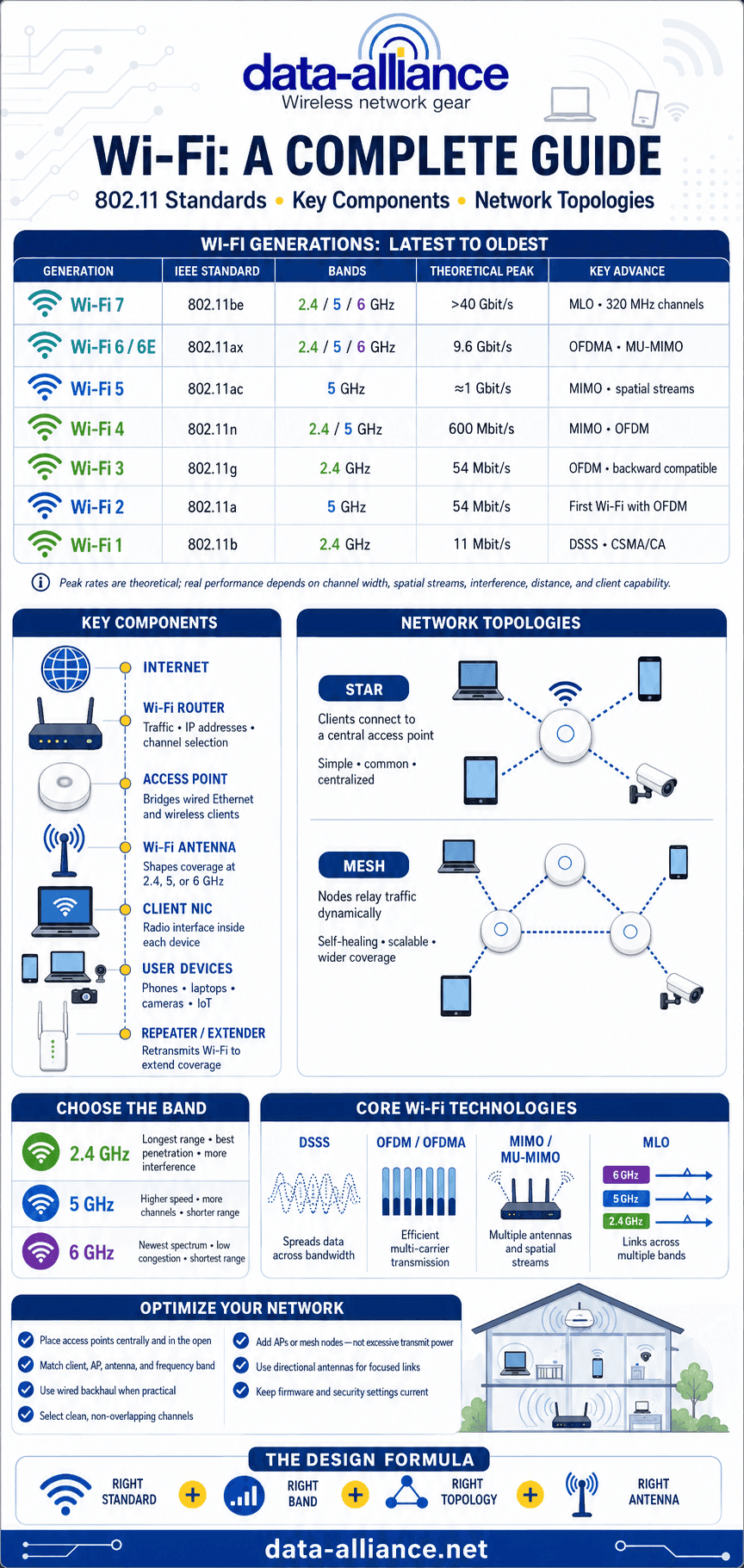
WiFi Network Standards Comparison Table
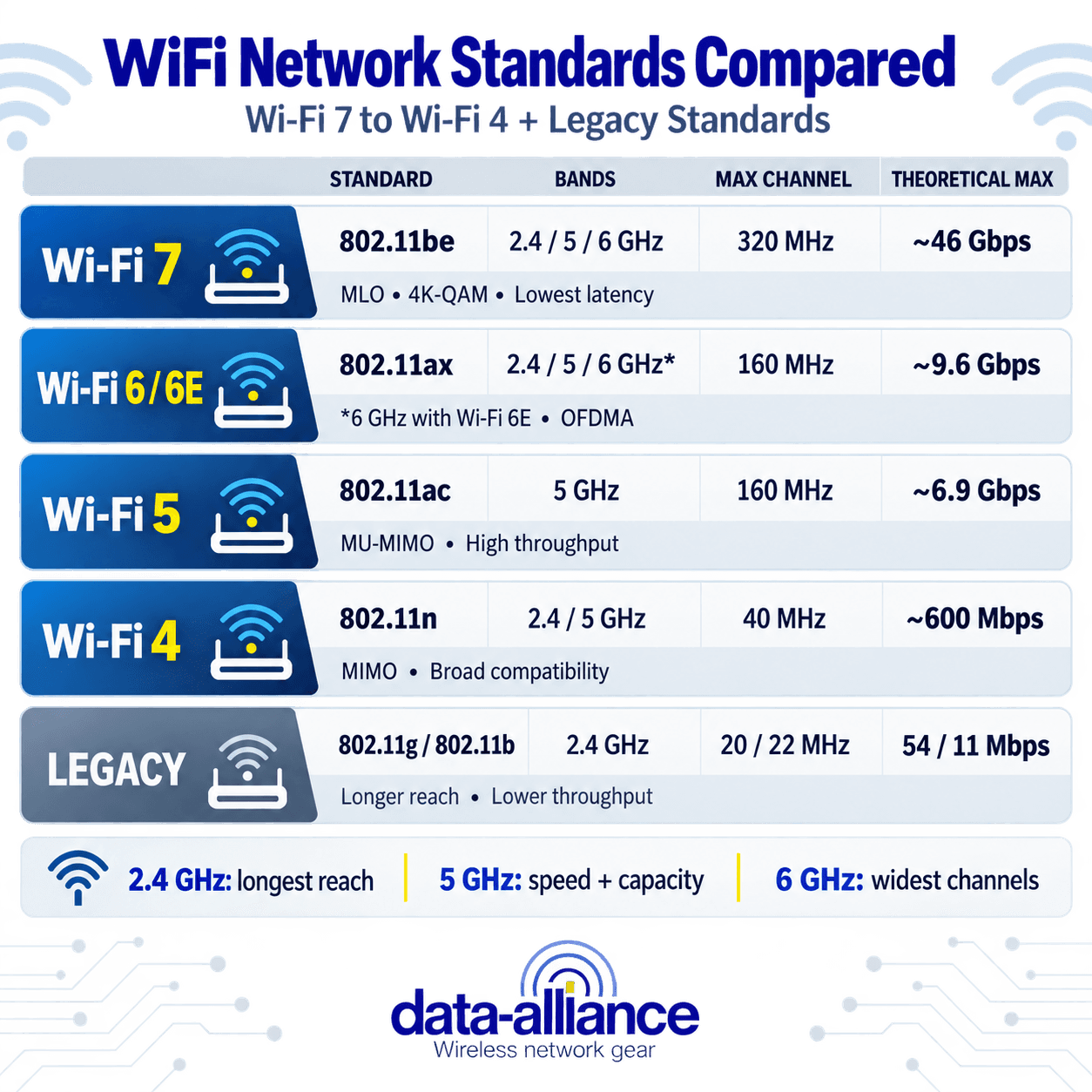
The table below summarizes the current and legacy WiFi network standards by their Wi-Fi Alliance name, frequency bands, and maximum theoretical throughput. Real-world throughput is always lower than the theoretical maximum because of protocol overhead, distance, interference, and the number of connected clients.
| Standard | Wi-Fi Name | Frequency Bands | Max Channel Width | Max Theoretical Speed |
| 802.11b | (legacy) | 2.4 GHz | 22 MHz | ~11 Mbps |
| 802.11g | (legacy) | 2.4 GHz | 20 MHz | ~54 Mbps |
| 802.11a | (legacy) | 5 GHz | 20 MHz | ~54 Mbps |
| 802.11n | Wi-Fi 4 | 2.4 GHz / optional 5 GHz | 40 MHz | ~600 Mbps |
| 802.11ac | Wi-Fi 5 | 5 GHz only | 160 MHz | ~6.9 Gbps |
| 802.11ax | Wi-Fi 6 | 2.4 & 5 GHz | 160 MHz | ~9.6 Gbps |
| 802.11ax (6E) | Wi-Fi 6E | 2.4, 5 & 6 GHz | 160 MHz | ~9.6 Gbp |
| 802.11be | Wi‑Fi 7 | 2.4, 5 & 6 GHz | 320 MHz | ~46 Gbps |
The approximately 46 Gbps figure is the theoretical maximum across the standard’s full capabilities—not the speed expected from an ordinary router or client device. IEEE describes 802.11be as supporting at least one operating mode exceeding 30 Gbps at the MAC service interface. IEEE 802.11be-2024
Wi‑Fi 7 (802.11be): Faster Speeds, Lower Latency and Multi-Link Operation
Wi‑Fi 7, based on IEEE 802.11be, is the generation following Wi‑Fi 6 and Wi‑Fi 6E. It can operate in the 2.4 GHz, 5 GHz, and 6 GHz bands, but its largest performance improvements are available in the 6 GHz band, where sufficiently wide, clean spectrum may support 320 MHz channels.
The principal Wi‑Fi 7 improvements include:
- 320 MHz channel width: Wi‑Fi 7 can double the maximum channel width of Wi‑Fi 6E from 160 MHz to 320 MHz. This creates substantially more capacity, although 320 MHz operation requires compatible equipment and sufficient locally authorized 6 GHz spectrum.
- 4K-QAM modulation: Wi‑Fi 7 increases modulation from the 1024-QAM used by Wi‑Fi 6 to 4096-QAM. Under excellent signal conditions, this allows approximately 20% more data to be carried in each transmission. The benefit decreases as distance, attenuation, or interference reduces signal quality.
- Multi-Link Operation (MLO): A compatible Wi‑Fi 7 device can use or coordinate multiple links across different frequency bands or channels. Depending on the device implementation, MLO can increase throughput, reduce latency, improve reliability, or move traffic away from a congested link.
- Multi-RU and improved spectrum utilization: Wi‑Fi 7 can allocate multiple resource units to a device and make better use of partially occupied channels. Preamble puncturing allows a network to use the clear portions of a wide channel instead of abandoning the entire channel because one section is affected by interference.
- Additional spatial-stream capability: The complete 802.11be specification supports as many as 16 spatial streams, compared with a maximum of eight under Wi‑Fi 6. Consumer routers and client devices generally implement far fewer streams, so advertised product speed should not be confused with the theoretical maximum of the standard.
Wi‑Fi 7 Compared with Wi‑Fi 6E
Wi‑Fi 6E and Wi‑Fi 7 can both use the 6 GHz band, but Wi‑Fi 7 adds 320 MHz channels, 4K-QAM, Multi-Link Operation, and more flexible use of available spectrum. These improvements make Wi‑Fi 7 especially useful for multi-gigabit networking, augmented and virtual reality, high-resolution video, gaming, dense enterprise networks, and other applications sensitive to latency or congestion.
Wi‑Fi 7 does not automatically provide greater physical range. The 6 GHz signal generally has shorter practical range and weaker wall penetration than 5 GHz or 2.4 GHz. Wi‑Fi 7 improves capacity, efficiency, and link management, while coverage still depends heavily on frequency, transmit power, antenna placement, building construction, and interference.
For Wi‑Fi 7 installations, use antennas and RF components that cover every required band. A tri-band deployment may require support for 2.4 GHz, 5 GHz, and 6 GHz. Cable loss also increases with frequency, making short, low-loss coaxial cable particularly important for 6 GHz connections.
Wi‑Fi Alliance identifies 320 MHz channels, Multi-Link Operation, 4K-QAM, multiple resource units, and puncturing among Wi‑Fi 7’s defining capabilities. Wi‑Fi CERTIFIED 7
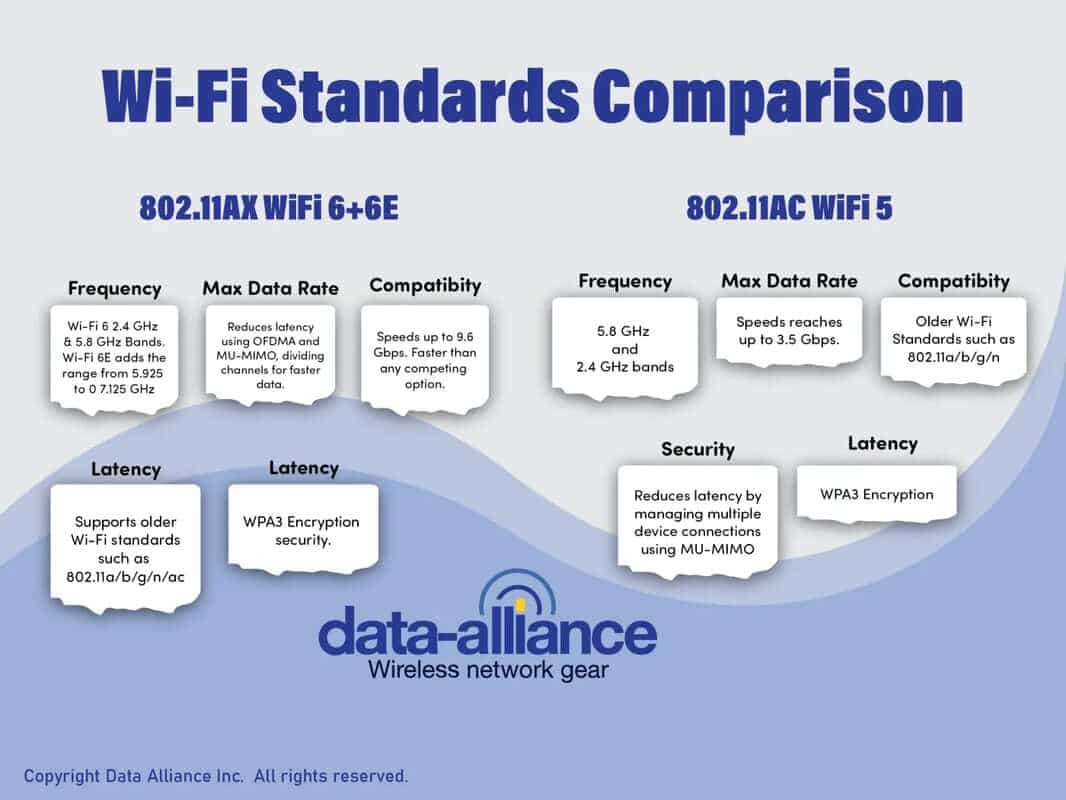
Wi-Fi 6 & 6E Compared to 802.11ac (Wi-Fi 5) and 802.11n (Wireless-N)
- Wi-Fi 6 (802.11ax) operates in both the 2.4 GHz and 5 GHz frequency bands.
- Wi-Fi 6E is an extension of Wi-Fi 6 that adds access to the entire 6 GHz band, expanding usable spectrum from 5.925 GHz up to 7.125 GHz.
- 802.11ac, also known as Wi-Fi 5, operates exclusively in the 5 GHz band.
- Older standards such as 802.11n, 802.11g, and earlier primarily used the 2.4 GHz frequency band, with 5 GHz being optional for some 802.11n devices.
Advantages of 802.11ac over 802.11n
802.11ac introduced several major improvements over 802.11n, resulting in significantly higher throughput and better performance in dense environments:
Greater use of the 5 GHz band: While 802.11n can operate on both 2.4 GHz and 5 GHz, many implementations favored 2.4 GHz due to cost. 802.11ac operates exclusively on 5 GHz, which is far less congested and subject to less interference. A quality Wi-Fi antenna fitted to a 5 GHz router improves its range within usable distances. 2.4 GHz is optional with 802.11ac.
Wider channels: 802.11ac supports 80 MHz and optional 160 MHz channel widths, compared to 802.11n's maximum of 40 MHz. Wider channels allow much higher data rates. High-density modulation allows 256 different signals to be transmitted over the same frequency by phase-shifting each signal; this improves spectral efficiency up to 4 times over 802.11n.
256-QAM modulation: This higher-density modulation scheme increases throughput by approximately 33% compared to the 64-QAM used in 802.11n.
MU-MIMO: Multi-User MIMO allows an access point to transmit data to multiple devices simultaneously, whereas 802.11n serves devices sequentially.
Higher MIMO capability: 802.11ac supports up to 8 spatial streams (8×8 MIMO), compared to 802.11n's maximum of 4.
Standardized beamforming: Beamforming focuses RF energy toward the client device, improving signal strength, consistency, and power efficiency.
All of these advantages combined result in 802.11ac having a combined multiple-station throughput of at least 1 Gbps and a single-link throughput of at least 500 Mbps. 802.11ac features a wider bandwidth of 160 MHz, up to 8 MIMO spatial streams, higher-density 256-QAM modulation, and up to 4 simultaneous downlink users.
You will attain all of these benefits only if all the APs and devices in the network are 802.11ac. Otherwise, you would have the same performance with 802.11ac as with 802.11n.
Despite the significant differences between the two standards, 802.11ac is fully backward compatible with 802.11n. Devices that feature a dual-frequency receiver can easily switch between the two standards. While 802.11ac is backward compatible with 802.11n, legacy devices may reduce overall network efficiency when connected to newer access points.
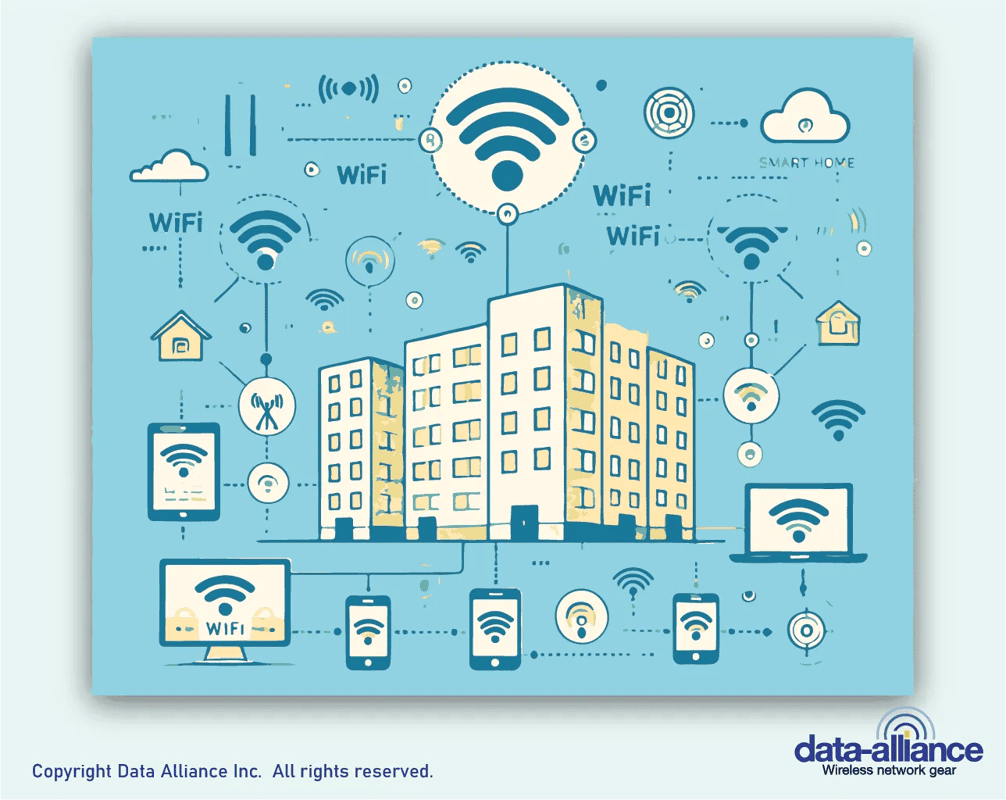
The IEEE 802.11ac is a wireless Wi-Fi standard developed within 2008-2013 to provide high-throughput connectivity across the 5 GHz band. The standard is an improvement on the earlier 802.11n wireless standard, which transmits via the 2.4 GHz frequency band.
Application-Specific Advantages
Streaming media on a local-area network: 802.11ac is the best choice because of the much higher throughput. Note that 802.11n wireless adapters only work optimally when connecting to an 802.11n access point that is operating in 802.11n mode.
Frequency Ranges of the 802.11 Network Types
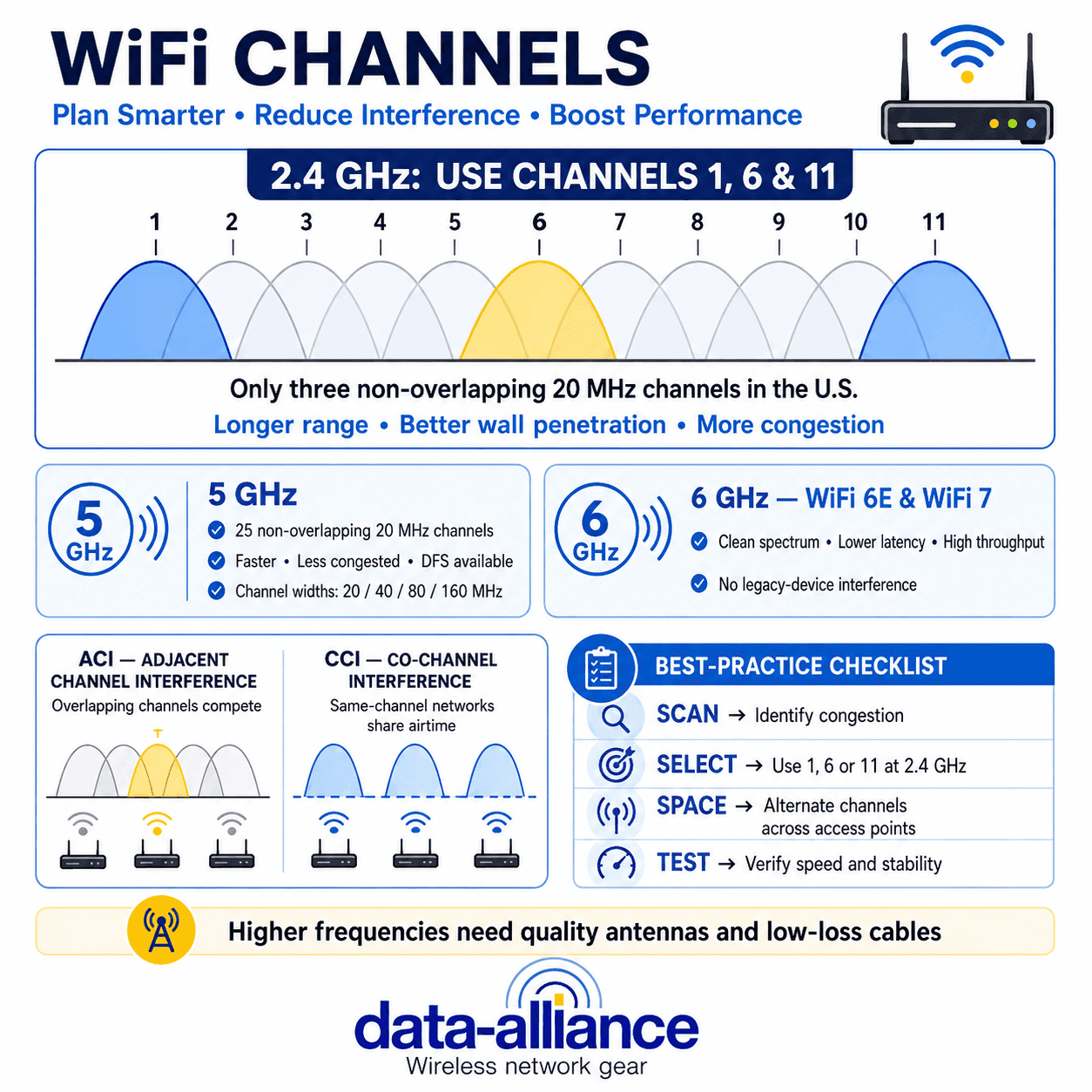
Wi-Fi 6E — 6 GHz. The 6 GHz band provides clean spectrum with no legacy devices, enabling wider channels, lower latency, and reduced interference — ideal for high-density environments.
5 GHz (802.11 a/n/ac/ax)
2.4 GHz (802.11 b/g/n/ax)
900 MHz (802.11ah / Wi-Fi HaLow)
60 GHz (802.11ad / ay)
WiFi Frequency Band Advantages and Disadvantages
WiFi is operable at the frequencies below, with more capacity being aggressively sought in other parts of the radio-frequency spectrum as the more congested frequencies become prone to interference. This has led to the expansion of WiFi into the sub-microwave and microwave frequencies, though coverage is decidedly lower at the higher bands. The table summarizes the core tradeoff: lower frequencies travel farther and penetrate walls better, while higher frequencies carry more data but over shorter distances.
Band | 802.11 Standards | Range / Penetration | Throughput / Congestion |
900 MHz | 802.11ah (HaLow) | Longest range, best penetration | Low data rate, low congestion |
2.4 GHz | b / g / n / ax | Good range and wall penetration | Moderate speed, very congested |
5 GHz | a / n / ac / ax | Shorter range, less penetration | High speed, up to ~23 channels |
6 GHz | ax (Wi‑Fi 6E) / be (Wi‑Fi 7) | Highest sub-7 GHz capacity; supports channels up to 320 MHz with Wi‑Fi 7 | Highest speed, cleanest spectrum |
60 GHz | ad / ay | Same-room only | Multi-Gbps, cable replacement |
- The 2.4 GHz frequency band is commonly used for WiFi because it is typically unlicensed around the world. 802.11 b/g/n specify the use of this frequency, which provides good coverage and penetration. This band suffers a lot of interference from other wireless products that use it, including microwave ovens, cordless phones, and wireless technologies like Bluetooth and ZigBee.
- 5 GHz WiFi is specified by 802.11 a/h/j/n/ac/ax. It has far greater capacity than its lower-frequency counterparts, with up to 23 distinct channels, but lower coverage and penetration of walls.
- 5.9 GHz is currently allocated for Intelligent Transport Systems but has been aggressively targeted for WiFi, facing pushback from the automotive industry, which feels that sharing this band may be a transport safety risk.
- 900 MHz, known as Wi-Fi HaLow, uses the 900 MHz ISM band to provide longer-range WiFi coverage with lower energy consumption. Its protocol, 802.11ah, was published in 2017.
- 6 GHz, or the Unlicensed National Information Infrastructure (U-NII) frequency band, has an allocation of about 1,200 MHz for use by WiFi according to the Wi-Fi 6E protocol.
- 60 GHz was devised by the Wireless Gigabit Alliance, which merged with the Wi-Fi Alliance to publish the standard 802.11ad. Operating at such a high frequency allows high-speed, high-volume data transfer, especially as there are relatively vast amounts of unallocated spectrum around this frequency. However, coverage is drastically reduced compared to lower-frequency networks, often limited to the same room. It is intended to be used alongside lower frequencies, or as a cable replacement for short-distance, high-traffic wireless links.
802.11n (Also Called Wireless-N)
Wireless-N (802.11n) is the generation of wireless networking technology prior to 802.11ac. 802.11n enables speeds up to 300 Mbps and is backward compatible with 802.11g and 802.11b.
802.11n built upon the previous 802.11g standard by adding two new technologies:
- Frame Aggregation technology: increases throughput by sending two or more data frames in a single transmission.
- MIMO
802.11n products have one of the following configurations: "3 TX + 3 RX", "2 TX + 2 RX", or "1 TX + 1 RX" — all using MIMO technology. "1 TX + 1 RX" products have only one antenna.
802.11n is mostly deployed in the 2.4 GHz frequency band. 5 GHz is an optional component that most manufacturers ignore in favor of the cheaper, and much more congested, 2.4 GHz. We offer a dual-band antenna for the 2.4 GHz band and the 5.x GHz band.
802.11a Uses the Frequency Range 5.2 to 5.8 GHz
This range of frequencies is much less used than 2.4 GHz. 802.11a allows for so many channels that you don't have to worry about interference between access points. In the U.S., 802.11a offers eight non-overlapping channels versus the three channels shared by 802.11b and 802.11g. If the company or department next door (or upstairs or downstairs) has an 802.11a network, more channels make it easier to configure your 802.11a network to avoid interference. In dense installations, extra channels can make 802.11a networks up to 14 times faster than 802.11b networks.
If you operate a wireless adapter made for Wireless-N on an 802.11 b/g network, it will have lesser performance and signal strength than an 802.11g adapter of similar specifications. We reached these conclusions in part by comparing the Alfa 1000 mW G version (AWUS036H) and the Alfa 2000 mW N version (AWUS036NH). Connecting to an 802.11g network? Then an 802.11g wireless USB adapter will perform better than an 802.11n USB adapter.
- 802.11b will provide better range/distance than 802.11g.
- 802.11g cards automatically select 802.11b mode for long-distance connections.
802.11b for Long-Distance Links on Older Gear
If you are trying to reach a distant or weak network signal for internet access, 802.11b will provide better range/distance than 802.11g, and 802.11b provides plenty of bandwidth for internet access at broadband speed.
For longer-distance links, your wireless card or USB adapter will automatically select a lower-bandwidth data rate — that is, it will automatically select 802.11b mode. Many people assume that 802.11g mode is better than 802.11b for their situation. However, if range matters more than bandwidth, run your card or adapter in 802.11b mode: 802.11b has better range and penetration, and its throughput degrades less over the same distance and obstacles. This scenario applies to internet access for web surfing and email: your bandwidth bottleneck is the Internet connection, not the "B" bandwidth. If you are using the connection for local-area networking that requires a lot of bandwidth (file sharing, streaming media on the local network), then you should use 802.11g or 802.11n mode.
An 802.11g access point will support clients operating in either 802.11b or 802.11g mode. Similarly, a laptop with an 802.11g card can access 802.11b access points as well as 802.11g access points. 802.11b and g clients automatically select the best data rate based on available signal strength. For longer-distance links or links with some obstruction (no clear line of sight), there is no added benefit in having an 802.11g client compared to an 802.11b client. A directional Yagi antenna at each end of the link will do more for range than choosing a newer standard.
The selected data rate will be 1, 2, 5.5, or 11 Mbps. The rate is influenced by signal-strength factors such as the distance between the access point and client radio and the degree of line-of-sight openness versus obstruction. For the longest links, the lowest data rate is selected; for short links with no obstructions, the highest data rate is selected.
Many major WiFi implementations, such as municipality-wide networks and apartment complexes, were still using 802.11b as late as 2018. The reasons are:
- G requires the use of three different channels simultaneously, and a network implementation may have a constraint against locking up three channels.
- B is fast enough and lower cost (with actual throughput of 1 to 6 Mbps exceeding the Internet connection speed).
- Any B client on an 802.11g network will force the access point to operate in B mode, nullifying the bandwidth advantages of G.
802.11b equipment can transmit data frames at rates up to 11 Mbps, and the network protocol overhead reduces the actual net data-transmission rate to 5-6 Mbps. A laptop's battery charge also lasts longer with 802.11b because it consumes less power than either 802.11g or 802.11a.
The 802.11b Wi-Fi standard is still in occasional use, although its prevalence has greatly diminished compared to newer standards like 802.11ac (Wi-Fi 5) and 802.11ax (Wi-Fi 6). Originally ratified in 1999, 802.11b was one of the first widely adopted Wi-Fi standards, offering speeds up to 11 Mbps. Despite its slow speed by modern standards and inefficient spectrum usage, 802.11b can still be found in older equipment or in specific setups where compatibility with legacy devices is necessary.
Which Wi-Fi Standard Should You Choose?
- Wi‑Fi 7: Best for new high-performance networks requiring multi-gigabit capacity, lower latency, improved reliability, or better use of the 6 GHz band. Its greatest benefits require Wi‑Fi 7 support at both the access point and client, plus locally available 6 GHz spectrum.
Wi-Fi 6E: Best for high-density, low-latency, interference-free environments.
Wi-Fi 6: Ideal for mixed-device networks with many clients.
802.11ac (Wi-Fi 5): Excellent performance for most 5 GHz networks and streaming.
802.11n / b / g: Best suited for legacy equipment, long-range, or low-bandwidth applications.
Whatever standard you deploy, the antenna and cable matter as much as the radio. Browse WiFi antennas, dual-band 2.4/5 GHz antennas, and Wi-Fi 6/6E antennas, or contact our technical support team for help matching an antenna and cable to your access point.
FAQs
What’s the difference between Wi-Fi 6 and Wi-Fi 6E?
Wi-Fi 6 (802.11ax) operates on 2.4 GHz and 5 GHz, while Wi-Fi 6E is an extension of Wi-Fi 6 that adds the 6 GHz band (from 5.925 GHz up to 7.125 GHz). The big advantage of 6E is cleaner spectrum with fewer legacy devices, which can reduce interference and latency in busy environments.
What frequency bands do Wi-Fi 4, 5, 6, and 6E use?
- 802.11n (Wi-Fi 4): 2.4 GHz (most common) with optional 5 GHz
- 802.11ac (Wi-Fi 5): 5 GHz only
- 802.11ax (Wi-Fi 6): 2.4 GHz + 5 GHz
- Wi-Fi 6E: 2.4 GHz + 5 GHz + 6 GHz
Why is 802.11ac (Wi-Fi 5) usually faster than 802.11n (Wi-Fi 4)?
802.11ac introduced major upgrades over 802.11n, including:
- More use of 5 GHz (typically less congested than 2.4 GHz)
- Wider channels (80 MHz and optional 160 MHz vs. 40 MHz max on 802.11n)
- 256-QAM modulation (about 33% throughput improvement vs. 64-QAM)
- MU-MIMO, more spatial streams (up to 8×8 MIMO), and beamforming
If I buy a Wi-Fi 6 or 6E router, will my older devices still work?
Yes. Newer routers are generally backward compatible with older Wi-Fi standards (like 802.11n/ac). However, legacy devices can reduce overall network efficiency, especially in busy networks, because the router may spend airtime supporting older modes.
Why does 5 GHz often feel “better” than 2.4 GHz?
In many environments, 5 GHz is less congested and offers more available channels, which can improve stability and speed—especially for streaming and higher-throughput local networking. The tradeoff is that 5 GHz usually has less wall penetration and range than 2.4 GHz.
When does it make sense to use an older standard like 802.11b/g/n?
Older standards can still be useful in special cases:
- Long-distance or weak-signal links where range matters more than speed
- Legacy device compatibility (older equipment that can’t connect to newer modes)
- Low-bandwidth needs like basic internet browsing/email, where the bottleneck is the ISP connection, not Wi-Fi
In some long-range scenarios, devices may automatically drop to lower rates (even 802.11b) to maintain reliability.
Which Wi-Fi standard should I choose for my situation?
- Wi-Fi 6E: Best for high-density, low-latency, interference-sensitive environments (more clean spectrum)
- Wi-Fi 6: Best for mixed-device networks with many clients
- Wi-Fi 5 (802.11ac): Excellent choice for most 5 GHz networks and streaming
- Wi-Fi 4 / b / g: Best for legacy gear, long-range, or low-bandwidth use cases
What is the difference between Wi Fi 7 and Wi Fi 6E?
Both Wi‑Fi 7 and Wi‑Fi 6E can operate in the 6 GHz band. Wi‑Fi 7 adds channels up to 320 MHz wide, 4096-QAM modulation, Multi-Link Operation, multiple resource-unit allocation, and improved use of partially occupied channels. These features can provide higher throughput, lower latency, and more reliable performance when both the access point and client support them.
Does Wi Fi 7 have better range than Wi Fi 6 or Wi Fi 6E?
Not inherently. Wi‑Fi 7 improves speed, capacity, latency, and link management, but it does not change the basic propagation characteristics of the frequency bands. A 2.4 GHz connection will generally reach farther and penetrate obstacles better than 5 GHz or 6 GHz. Wi‑Fi 7 can improve reliability by using Multi-Link Operation, but antenna design, placement, transmit power, cable loss, and the physical environment remain critical.