



Antennas, Antenna Cables, Wireless Products: Technical Articles
Antenna Cable Installation, Management and Labeling: Best Practices
Table of Contents
Best Practices
Installing and Routing Antenna Cables
By following these guidelines, you can ensure a tidy and efficient antenna cable installation that maintains the integrity and performance of your RF system. Proper installation and routing are critical for maximizing signal strength and minimizing signal loss, especially in LTE/5G, WiFi, and IoT applications.
Minimize Cable Length
Keep the cable as short as possible to reduce signal attenuation (measured in dB). Longer cables introduce greater signal loss, especially at higher frequencies.
Data Alliance Tip:
Use low-loss coaxial cables (LMR-200, LMR-240, LMR-400) for longer runs.
Use U.FL or MHF4 cables only for short internal connections (e.g., inside devices).
Avoid Sharp Bends
Sharp bends can damage the dielectric and shielding, causing signal degradation and impedance mismatch.
Maintain a bend radius of at least:
- 5x cable diameter (minimum)
- Preferably 10x for optimal performance
MHF4 and U.FL cables tolerate tighter spaces but still require careful routing.
Avoid Electrical Interference
Keep antenna cables away from:
- Power lines
- Motors
- Transformers
Maintain at least 6 inches (15 cm) separation
Cross power lines at 90° angles
Grounding
Proper grounding is critical for:
- Lightning protection
- Reducing RF noise
- Equipment safety
Use:
- Grounding blocks
- Lightning surge protectors (Data Alliance offers these)
Seal Outdoor Connections
Outdoor RF connections must be waterproofed.
Recommended:
- Self-amalgamating tape
- Weatherproof boots
- Outdoor-rated connectors
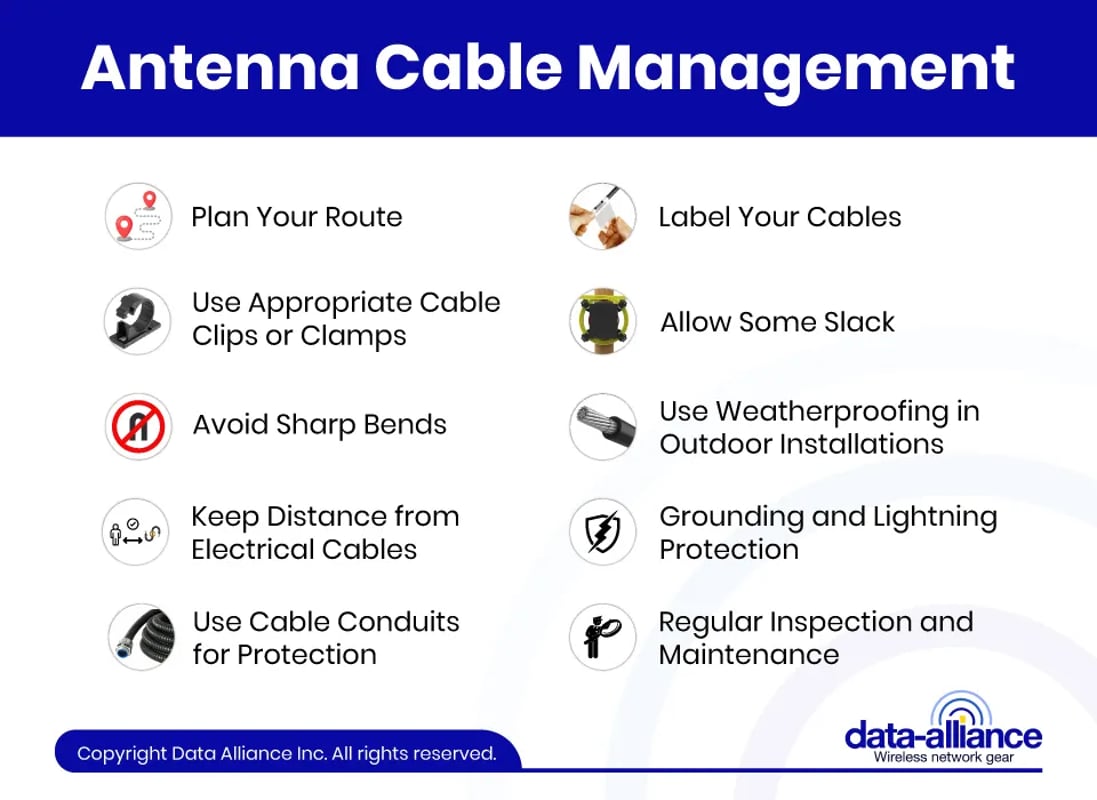
Antenna Cable Management
If you need to extend the reach of an existing SMA Cable or RP-SMA Cable, consider using SMA Extension Cables or RP-SMA Extension Cables. Also using cable clips or conduits to secure the cable, especially when running it along walls or under eaves will prevent damage from environmental factors and physical strain. Proper cable management is crucial when installing antenna cables, as it ensures not only a neat appearance but also reduces the risk of damage and interference. Here are some key tips for managing antenna cables effectively:
- Plan Your Route: Before running the cable, plan its route from the antenna to the receiver. Avoid long, circuitous paths. Try to find the shortest and most direct route while considering potential obstacles.
- Use Appropriate Cable Clips or Clamps: Secure the cable at regular intervals using suitable clips or clamps. This prevents sagging and reduces the risk of the cable getting caught or damaged. Ensure that the clips or clamps are tight enough to hold the cable but not so tight that they crush or pinch it.
- Avoid Sharp Bends: Sharp bends can damage the internal structure of the cable, leading to signal loss. Maintain a gentle curve in the cable wherever turns are necessary.
- Keep Distance from Electrical Cables: Running antenna cables parallel to electrical power cables can introduce interference. Keep them as far apart as possible. If they must cross, do so at a 90-degree angle.
- Use Cable Conduits for Protection: In areas where the cable might be exposed to physical damage, like in a garage or along the outside of a building, use conduits to protect the cable.
- Label Your Cables: If you are running multiple cables, label them at both ends. This makes it easier to identify and troubleshoot them in the future.
- Allow Some Slack: Always leave a bit of extra cable at both ends of the run. This slack can be useful if you need to reposition equipment or if a connector needs to be replaced.
- Use Weatherproofing in Outdoor Installations: For cables that run outside, use weatherproof cable or add weatherproofing measures, like sealing connections with weatherproof tape or using outdoor-rated cable conduits.
- Grounding and Lightning Protection: If your antenna is outdoors, make sure it is properly grounded. This helps to protect against electrical surges due to lightning strikes.
- Regular Inspection and Maintenance: Regularly check your cable runs for damage, wear, or loose fittings, especially if they are exposed to the elements.
Labeling for Antenna Cable Management
Proper labeling is essential for troubleshooting, upgrades, and multi-antenna systems.
Label Both Ends
Always label:
- Antenna side
- Device side
Especially important when using adapters like:
- SMA to RP-SMA
- U.FL to SMA
- RP-SMA to N
Use Durable Labels
Use:
- Heat shrink labels
- UV-resistant tags
- Industrial markers
Include Key Information
Example label:
- “LTE Antenna 1 → Router Port A”
- “5G MIMO Port 2”
Use Color Coding
- Red = LTE
- Blue = WiFi
- Green = GPS
Speeds up troubleshooting
Use Consistent Format
Keep:
- Same naming style
- Same label position
Use Cable Tags for Thick Coax
For LMR-400 or larger:
Use wrap-around tags
Update Labels After Changes
Critical in:
- IoT deployments
- Multi-antenna systems
Remember, the goal of labeling is not just to identify cables during the installation but also to ensure that any future modifications, troubleshooting, or repairs can be done efficiently and accurately.
Regular Maintenance: Periodically check the cables and connectors for damage or corrosion, especially if they are exposed to harsh weather conditions.
Professional Installation for Complex Setups : If your setup is complex or you're unsure, consider hiring a professional to ensure optimal installation and performance.
Always remember to follow the manufacturer's instructions and local building codes. The practices might vary slightly depending on the type of antenna, the building's structure, and local environmental conditions.
Choosing the Right Antenna Cable
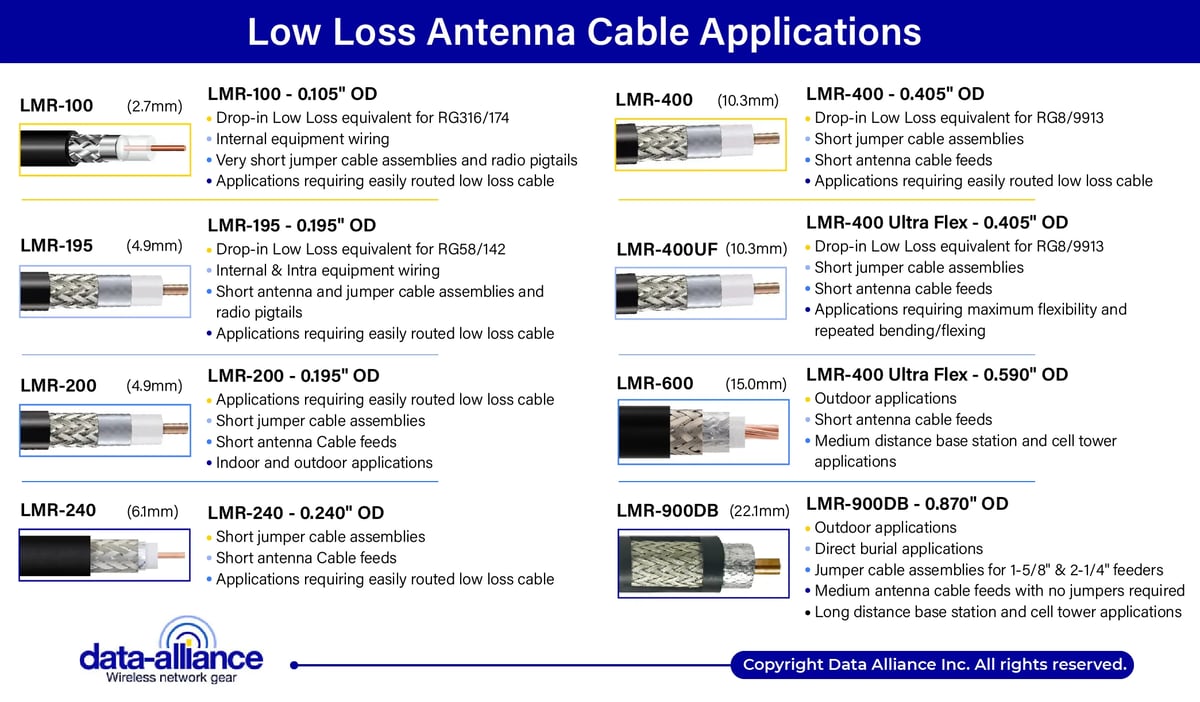
Selecting the correct coaxial cable is essential for minimizing signal loss and ensuring optimal RF performance.
Recommended by Application:
Application | Recommended Cable |
Short internal connections | U.FL / MHF4 |
LTE / 5G routers | LMR-100 / LMR-200 |
Outdoor antennas | LMR-240 / LMR-400 |
Long-distance runs | LMR-400 or higher |
Lower loss = better signal strength
Integration with LTE, 5G and IoT Systems
Antenna cables play a critical role in RF system performance, especially in modern wireless deployments.
Example Setup:
Antenna → Coax Cable → LTE/5G Router → Ethernet → Network
Applications:
- Remote monitoring
- Industrial IoT
- Rural connectivity
- Smart agriculture
Low Loss Antenna Cable Coax Applications
Low-loss coaxial cables are essential in RF systems where signal integrity is critical.
Used in:
- LTE / 5G systems
- WiFi antennas
- GPS applications
- RF communication systems
Data Alliance specializes in:
- Low-loss cables
- RF connectors
- Antenna systems
Conclusion
In summary, proper antenna cable installation, routing, management, and labeling are critical to achieving maximum RF performance, reliability, and long-term system stability. By minimizing cable length, avoiding sharp bends, reducing interference, and using appropriate low-loss coaxial cables, you can significantly improve signal strength and overall system efficiency. Effective cable management and clear labeling not only create a clean and professional installation but also simplify future maintenance, troubleshooting, and system expansion—especially in complex LTE/5G, IoT, and multi-antenna environments.
Whether deploying a simple setup or a large-scale network, following these best practices ensures your antenna system operates at peak performance. Selecting the right cable, using proper protection methods, and maintaining your installation over time will protect your investment and deliver consistent, high-quality connectivity. At Data Alliance, we emphasize using high-quality low-loss cables, reliable connectors, and proper installation techniques to support demanding RF applications in real-world environments.
FAQs
Why is minimizing antenna cable length important?
Shorter cables reduce signal loss (attenuation), especially at higher frequencies. Using low-loss cables like LMR-240 or LMR-400 helps maintain stronger signal performance over longer distances.
What is the proper bend radius for antenna cables?
Antenna cables should maintain a bend radius of at least 5x the cable diameter (minimum) and ideally 10x to prevent signal degradation and internal damage.
How can I prevent interference in antenna cable installations?
Keep antenna cables at least 6 inches (15 cm) away from power lines and electrical equipment, and cross them at 90-degree angles to minimize electromagnetic interference (EMI).
What type of coaxial cable should I use for LTE/5G applications?
For LTE/5G systems, LMR-100 or LMR-200 are suitable for shorter runs, while LMR-240 or LMR-400 are recommended for outdoor or longer-distance installations.
How do I protect antenna cable connections outdoors?
Use weatherproof connectors, self-amalgamating tape, and outdoor-rated cables to seal connections and prevent moisture damage.
Why is labeling antenna cables important?
Labeling both ends of each cable simplifies troubleshooting, maintenance, and system upgrades—especially in multi-antenna or IoT deployments.
How are antenna cables used in IoT and wireless systems?
Antenna cables connect RF antennas to devices like LTE/5G routers, enabling reliable communication in applications such as remote monitoring, smart agriculture, and industrial IoT networks.